Complete Reporting Solution for D365 Business Central (BC) in the UAE
Business Central reporting UAE finance teams can rely on: Power BI dashboards and Excel reports in AED, with UAE VAT views.






WHAT WE OFFER
From Business Central Data to Real Business Insights
We build a robust reporting framework for Microsoft Dynamics 365 Business Central (BC) by converting your data into a
unified and centralized analytics model.
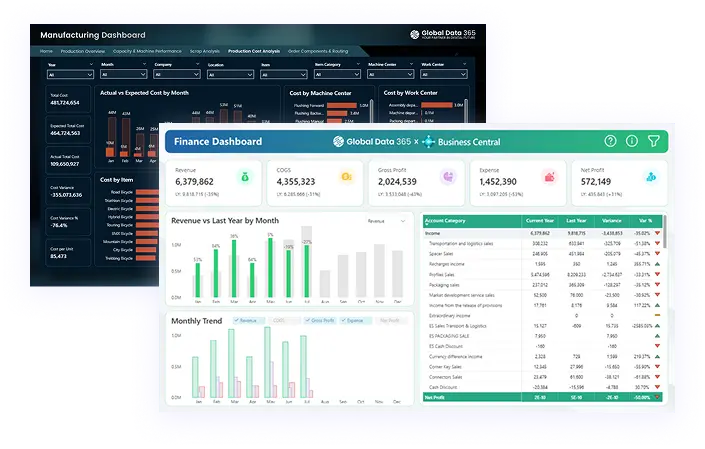
This model delivers a wide range of KPIs through ready-to-use Power BI and Excel dashboards.
Plug-and-Play Analytics for D365 BC
Pre-built data models and dashboards for instant insights with drag and drop
Complete D365 BC Automation
Eliminate manual reporting and save 40+ hours every month
100+ Excel and 65+ Power BI Reports
100+ Excel and 65+ Power BI Reports pre-built and fully customizable for you
Go Live Faster with Ready-to-Use
Business Central Power BI Dashboards
Real-Time Reports
Straight from Business Central
Turn your Business Central data into actionable insights with
Global Data 365 reporting solution built for smarter reporting.
Simplify Your Reporting Today
HOW IT WORKS
From ERP Data to Decision-Ready Insights Solutions Engineered for D365 BC
CHOOSE YOUR REPORTING APPROACH
D365 BC Solutions Built for Every Business Need
Enterprise Reporting: Jet Analytics for D365 F&O
Data Flow:
1. From D365 BC to Tables
- Data is accessed via APIs, OData services and direct SQL (on-prem).
- Cloud data is extracted through standard connectors.
2. Data Layer → Jet Processing Layer
- Data is stored in a centralized staging database.
- Jet Data Manager handles data extraction, cleansing, and transformation.
- Structured models are built into the Jet Data Warehouse.
- Jet Analysis Services optimize cubes for high-performance reporting
Key Features:
- Multiple Connectors: Integrates Business Central with other ERPs, CRM systems, and
external sources. - Data Consolidation: Combines multi-company and external datasets into one unified model.
- Scalable Architecture: Optimized ETL and warehouse design for growing data volumes.
- Customization: Tailored data models aligned with finance and operational KPIs.
Ruling:
A scalable enterprise data warehouse delivering structured, consolidated and high-performance Business Central reporting.
Operational Dashboards: Power BI for D365 F&O
Data Flow:
1. D365 Business Central → Power BI
Connect via APIs, OData feeds or native connectors.
2. Data Processing in Power BI
Clean, transform, and model data using Power Query and DAX.
3. Power BI → Business Users
Publish interactive dashboards for finance and operational teams.
Key Features:
- Interactive Dashboards: Real-time insights with dynamic visuals and drilldowns.
- Flexible Modeling: Custom KPIs, measures and filters for business needs.
- Lower Setup Cost: No full data warehouse required.
- Business Agility: Rapid deployment for decision-making dashboards.
Ruling:
A flexible and visualization-driven solution for dynamic Business Central dashboards in Power BI.
Excel-Based Reporting: Jet Report for D365 BC
Data Flow:
1. D365 F&O → Jet Reports (Excel Add-In)
Direct connection to Business Central data via APIs or database.
2. Query Processing
Real-time queries with built-in functions and optimized data retrieval.
3. Excel → Finance Reporting
Generate financial statements, budgets and ad-hoc reports in Excel.
Key Features:
Build live financial statements, trial balance, and ad-hoc reports directly
in Excel.
- Excel-Native Environment: Finance teams work in familiar spreadsheets.
- Live Data Access: No manual exports or copy-paste.
- Flexible Reporting: Create custom financial and operational reports
- Lightweight Setup: Minimal infrastructure and fast implementation.
Ruling:
The fastest and most flexible way to enable real-time Excel reporting for Business Central users.
Why Choose Our D365 BC Reporting Solutions?
Plug & Play Deployment
Pre-built connectors and structured data models allow
quick integration with Microsoft Dynamics 365 BC.
Minimal disruption. Faster go-live. Immediate reporting.
Scalable & Secure Architecture
Designed to grow with your business, supporting multi-entity reporting, role-based security and enterprise-level performance.
Complete End-to-End Reporting
From extracting your Business Central data to the final dashboard, we cover every step, including UAE VAT reporting with output and input VAT reconciled to your ledger.
Customizable & Forecast-Ready
Flexible architecture supports tailored financial models, custom KPIs, and advanced forecasting.
Adapt dashboards and reports as your business evolves.
WHY CHOOSE US
Customer Success Stories
Discover how UAE businesses like yours have transformed their operations with Business Central reporting teams trust. From advanced analytics and Microsoft Dynamics to automated ERP solutions, explore real-world examples of enhanced efficiency and performance
“I had the pleasure of working with Wahab Tariq and the Global Data 365 team on building out a Power BI sales dashboard for our regional operations across Saudi Arabia and UAE, and the experience was outstanding from start to finish”

Nabih Ballout
Sales Director KSA, Johnson Health Tech Saudi
“The 2 days training so helpful for our company. Jet report has more features than we expect. After the training we can create useful report therefore I recommend this training and the program for monitoring companies for future.”

YADİGAR KÖKSAL
Finance and Accounting Manager, ATC
“Global Data 365’s expertise with Jet Reports was instrumental in automating our reporting at SMT Africa. Their dedicated support and insightful training were exceptional. I highly recommend them for their exceptional services.”

Iqbal M.
IT Project Manager, SMT Africa
“Global Data 365 had provided a in depth training to me that enabled me to start multiple report design and help the user to extract their data from Navision for jet reporting. They are helpful and responsive even after the training.”

Joanne Chong
Business Analyst, TG Group of companies
“When working on implementing Jet Reports in Al Ghalia will was done in a timely manner as well the support and training provided by Global Data 365 was outstanding.”

Joseph Pires
Assistant Financial Controller. Al Ghalia
“I recently worked with Global Data 365 for upgrading JET. He was also responsible for training and consultation for our Dubai team. They are very resourceful and prompt in responding to our support request.”

Rukku Shantha
IT Manager, MPH Global
“Implemented Jet Report for IKEA with Global Data 365 who were professional, adhered to timelines, and provided advanced reporting tools. I highly recommend them.”

Ahmad Hammad
BI & ERP Specialist at SYH Retail, IKEA
“Collaborating with Global Data 365 for over two years, I’ve found them to be approachable and highly adaptable, even when dealing with unfamiliar territories. Our reports now run with exceptional accuracy and efficiency.”

Cesco Righetti
Chief Financial Officer UK, The Arts Club
Ready to Transform Your Business Central Reporting in the UAE?
Book a short demo and see Business Central reporting UAE built on your own data.
Frequently Asked Questions (FAQs)
The most effective tools for Dynamics 365 BC reporting include Power BI for interactive dashboards, Jet Analytics for enterprise data warehousing and Jet Reports for Excel-based reporting. Each tool serves a different need, from real-time visualization to structured financial reporting, depending on your business size and reporting complexity.
It depends on how many entities you have and how much your reporting needs to grow. Most UAE companies start with Power BI, because it gives live dashboards quickly and in AED. If you need a full data warehouse, we use Jet Analytics, and if your finance team prefers Excel, we use Jet Reports. A good Business Central reporting UAE setup often combines them: Power BI for management and Jet Reports for the finance team’s own statements.
For small businesses, Power BI is the best choice for creating power bi business central dashboards that are both powerful and easy to use. A power bi dashboard for business central allows you to connect directly to your ERP data, build interactive visuals, and track KPIs across finance, sales, and inventory in real time. With a business central power bi dashboard, businesses benefit from low setup cost, ready-to-use templates, and flexible customization without needing complex infrastructure. Overall, Power BI provides a scalable and efficient solution for small businesses looking to turn their Business Central data into actionable insights.
Yes. We bring output VAT (5%) and input VAT together by tax code and reconcile them to your general ledger, so you can see how the figures in your VAT return are made up. If a number looks unexpected, you can click through to the invoice behind it, which saves your team time at filing.
Sales and inventory report templates for Microsoft Dynamics 365 Business Central are available through built-in reports or reporting tools like Power BI and Jet Reports. These templates can be easily modified to reflect your product structure, warehouses and sales performance metrics. Check out the: D365 BC dashboards.
Yes. If you run several companies, for example mainland and free zone, or UAE and overseas subsidiaries, we can bring them into one consolidated view. AED is the base and other currencies are translated automatically. This is a common requirement in Business Central reporting UAE projects.
The most effective tools for financial reporting in Business Central(BC) include Jet Reports for Excel-based reports, Power BI for visual dashboards, and Jet Analytics for enterprise-level reporting and data consolidation.
Yes, advanced Business central reporting tools support forecasting, budgeting, and scenario analysis. With customizable data models and historical data integration, businesses can build accurate financial forecasts and strategic plans. Additionally, AI-assisted tools like BI Insights 365 further enhance forecasting capabilities, enabling smarter, data-driven planning (available on request via our sales team).
Related Resources