Purchase Dashboard Power BI
for D365 Finance & Operations(F&O)
Purchase Dashboard Power BI for D365 Finance & Operations(F&O)
Transform your procurement reporting with a modern and interactive Power BI Purchase Dashboard for D365 F&O covering both purchase orders and purchase invoices for complete visibility and control.
Gain control over your purchasing operations with real-time insights all from one D365 Finance and Operations dashboard.
Try the D365 F&O Purchase Dashboard Yourself
Get Personalized Purchase Dashboard
for D365 F&O
We take your D365 F&O purchase data and turn it into a clean, centralized finance and operations dashboard for organized procurement reporting.
Purchase Dashboard Modules
for D365 Finance & Operations(F&O)
From detailed purchase invoice analysis to real-time order pipeline tracking, gain complete visibility into your procurement operations with purchase analytics for D365 F&O and monitor spending patterns across your entire purchase cycle.
Purchase Invoices
Invoice-level insights & spend analysis
Overview
Customers
Items
Details
Cube
Analytics
Influencers
Overview
Customers
Items
Details
Cube
Analytics
Influencers
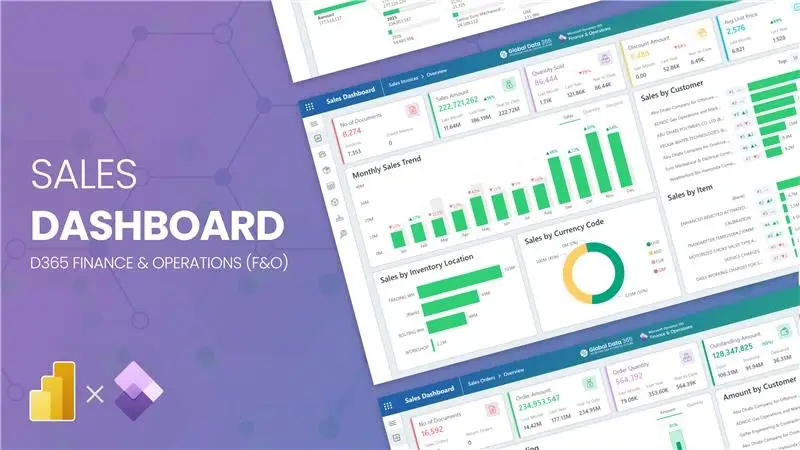
Track your complete purchase invoicing activity in D365 F&O from total invoice volume and spend to monthly purchase trends, discounts and your overall cost analysis with purchase analytics for D365 F&O.
- KPIs: No of Documents, Purchase Amount, Quantity, Discount Amount, After Discount
- Monthly Purchase Trend with YoY % change — by Amount, Quantity and Discount
- Spend by Vendor (Top N ranking with movement insights)
- Purchase by Item — highlight high-value procurement items
- Inventory Location & Currency Breakdown for spend distribution
Purchase Orders
Order pipeline & outstanding tracking
Overview
Customers
Items
Details
Cube
Analytics
Influencers
Overview
Customers
Items
Details
Cube
Analytics
Influencers
Monitor your entire purchase order pipeline in D365 F&O from total order value and outstanding amounts to monthly orders vs outstanding comparisons and procurement performance with purchase order dashboard in dynamics 365.
- KPIs: No of Documents, Order Amount, Order Quantity, Outstanding Amount & Quantity
- Monthly Orders vs Outstanding — Amount & Quantity with % open insights
- Amount by Vendor — ranked by your total order value
- Amount by Item — top items driving procurement volume
- Inventory Location & Currency Split for operational visibility
What Our Customers Have to Say About Us
Working with Global Data 365 has been a fantastic experience. Their Power BI reports have completely transformed how we analyze and use our data. The insights are clear, actionable, and have made decision-making so much easier for our team.

Tres Nelson
Manager BI - Signature Systems
Global Data 365 delivered an exceptional inventory dashboard for Baker Hughes. The Power BI solution provided real-time insights, streamlined inventory management, and improved decision-making across our operations.

Alan Siqueira
Inventory Manager - Baker Hughes
Thanks to Global Data 365 for their outstanding Power BI service. We are grateful for the opportunity to work with Global Data 365’s team of talented and committed individuals

Mohammad Arshad
Financial Control & Reporting Assistant Manager - PepsiCo
It was a genuine pleasure working with Global Data 365. They consistently demonstrated patience, professionalism, and attentiveness to my requirements. Their expertise in Power BI is impressive; they quickly comprehends the concepts I aim to communicate and promptly provides effective solutions.

Rana Yaseen
Accounting Manager - Boston Scientific
We are incredibly impressed with the sales dashboard designed for us on Power BI by Global Data 365. The dashboard has provided us with valuable real-time insights into our sales performance. We would highly recommend their services to anyone looking to take their sales analysis to the next level.

Ahmad Hammad, MBA
BI & ERP Specialist at SYH Retail - IKEA
The supply chain dashboard on Power BI has revolutionized the way we manage our operations, providing real-time insights that enable us to optimize for maximum efficiency. They were highly professional and responsive throughout the process, and we highly recommend their services.

Mahmoud Mohsen
IT Administrator - Alif
FAQs on Purchase Dashboard For D365 F&O
A Purchase Dashboard for Dynamics 365 Finance & Operations (F&O) is a Power BI solution that connects directly to your D365 F&O procurement data to deliver real-time procurement analytics in a single dashboard view. It pulls your purchase orders, vendor invoices, and spend data straight from dynamics 365 F&O. It gives procurement teams and finance managers a consolidated, drill-through view of the entire D365 F&O purchase cycle, from order creation to invoice posting in purchase dashboard dynamics 365.
A comprehensive Power BI Purchase Dashboard for D365 F&O should track two core sets of KPIs. For purchase invoices: number of invoice documents, total purchase amount, quantity purchased, discount amount, and after-discount spend, with monthly YoY trend analysis by amount, quantity, and discount. For purchase orders: total order count, order amount, order quantity, outstanding amount, and outstanding quantity, with monthly orders vs. outstanding comparisons showing the percentage of open procurement pipeline. Both modules include Top N vendor rankings with movement tracking to identify growing or declining supplier relationships, top items driving procurement volume, inventory location breakdowns, and currency code splits, giving D365 F&O procurement and finance teams a complete picture of organizational spend management.
A D365 F&O Purchase Dashboard is built specifically to extract and visualize data from Microsoft Dynamics 365 Finance & Operations procurement tables, including purchase invoice headers and lines, purchase order entities, vendor master records, and item data as structured within D365 F&O's Accounts Payable and Procurement & Sourcing modules. A generic Purchases Department Dashboard may draw from any ERP or flat-file source and focuses on general procurement spend categories without ERP-native integration. The D365 F&O-specific purchase dashboard handles multi-legal entity structures, D365 F&O inventory location hierarchies, and the distinction between posted purchase invoices and open purchase orders natively, making it the right D365 F&O procurement reporting solution for organizations who need accurate, automated purchase analytics without manual data preparation or export workflows.
Yes, a D365 F&O Purchase Dashboard built on Power BI tracks both purchase orders and purchase invoices as dedicated reporting modules with side-by-side comparison capability. The purchase orders module shows total order amount alongside outstanding amount and outstanding quantity, enabling procurement teams to monitor how much of the D365 F&O purchase order pipeline has been received and invoiced versus what remains open. The purchase invoices module shows confirmed spend that has been posted and processed through Accounts Payable. Together, these two views deliver a complete order-to-invoice conversion picture in D365 F&O, allowing procurement managers to identify open PO backlogs, receipt delays, and invoice processing gaps, all within a single Power BI D365 F&O purchase reporting environment.
D365 F&O purchase data is extracted into Power BI through integration methods including OData entities exposed by Dynamics 365 F&O (such as purchase invoice header/line entities and purchase order entities), Azure Synapse Link for Dataverse (formerly Export to Data Lake/BYOD), or pre-built data connectors that map D365 F&O Accounts Payable and Procurement & Sourcing tables into a centralized analytics model. A well-structured D365 F&O purchase reporting solution normalizes posted invoice data, open order pipeline data, vendor master records, and item data into a unified Power BI data model, enabling the Purchase Dashboard to refresh automatically and reflect near-real-time D365 F&O procurement activity. This replaces the need for manual purchase report extracts from D365 F&O and ensures that KPIs like outstanding order amounts, vendor spend trends, and discount utilization are always current.
D365 F&O standard procurement workspaces, such as the Purchase Order Preparation and Vendor Invoice Entry workspaces, are designed for day-to-day transactional operations like order entry, receipt processing, and invoice approval. They offer limited cross-dimensional reporting and no native ability to compare purchase invoice spend trends against open purchase order pipelines in a single visual view. A Power BI Purchase Dashboard for D365 F&O transforms the same underlying D365 F&O procurement data into interactive analytics: monthly YoY spend trend charts, Top N vendor and item rankings with rank movement, purchase orders vs. outstanding comparisons, after-discount cost analysis, and AI-powered key influencer visuals to identify the drivers of spend increases or procurement anomalies. For organizations that need strategic D365 F&O procurement analytics and spend management intelligence, beyond what standard inquiry screens deliver, a dedicated Power BI purchase dashboard becomes a scalable extension of D365 F&O's reporting capabilities.
Related Resources