
Overview
Developed by Microsoft Power BI Desktop is a powerful business intelligence application designed to give users deep insight into their data and help them create interactive reports and dashboards. As the desktop counterpart to the Power BI app used across web and mobile, it’s the tool most teams use to build reports before publishing them online. This guide walks you through the complete Power BI Desktop download process using two simple methods. You can download Power BI Desktop from your browser or Microsoft Store for your specific needs.
Want to learn more about Power BI? Refer to the Power BI guide for business!
In this article, we’ll go through power bi download with different methods.
Power BI Desktop Download: Step-by-Step Guide
Power BI Desktop is a free standalone application for creating interactive dashboards in your Desktop. There are two different ways of downloading it in your system; The first method to download is from Microsoft Store and the second method is directly from your browser.
Download Using Microsoft Store
For Power BI download through Power BI desktop standalone installer by using Microsoft Store by going through the following steps:
1. First, search Microsoft Store in the Search menu in your Windows taskbar and click on Microsoft Store.
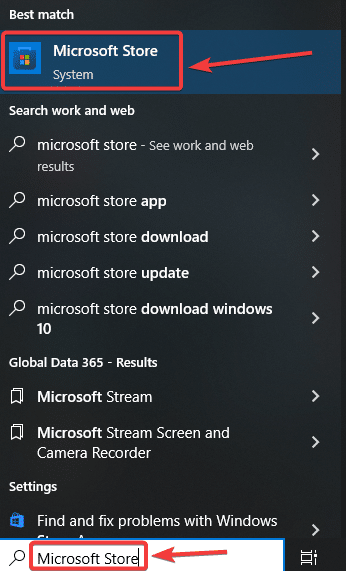
2. Microsoft App Store will open. Then in the search bar, write Power BI Desktop and press enter.
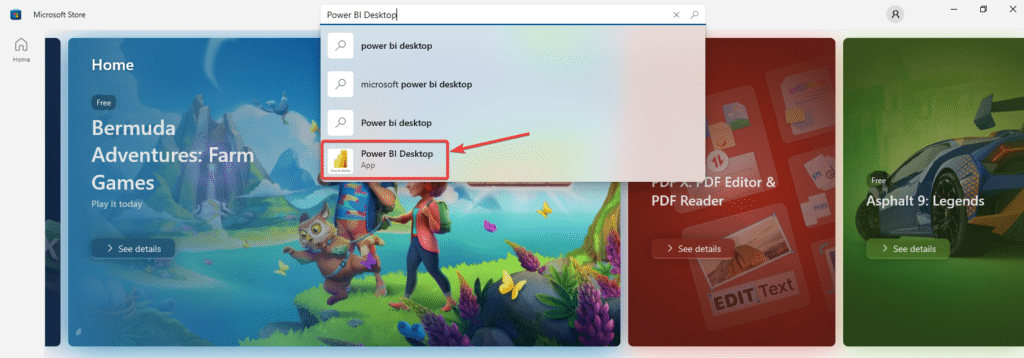
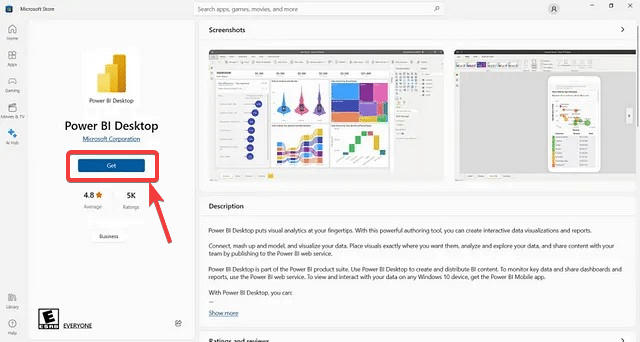
3. Select Power BI Desktop and click Get to begin your download.
👉 Join our Power BI Training and gain hands-on skills to turn insights into action.
Download Power BI Using your Browser
You can download using your Browser by following steps:
1. Go to your browser and search Power BI Desktop download. Then click on the first link.
Or follow the given link: https://powerbi.microsoft.com/en-us/desktop/
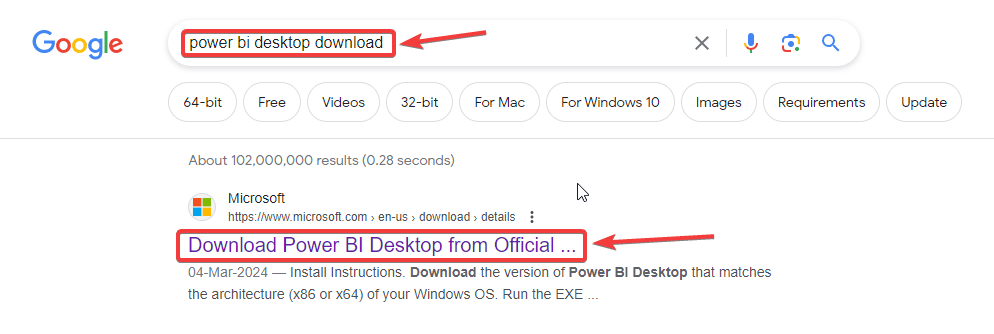
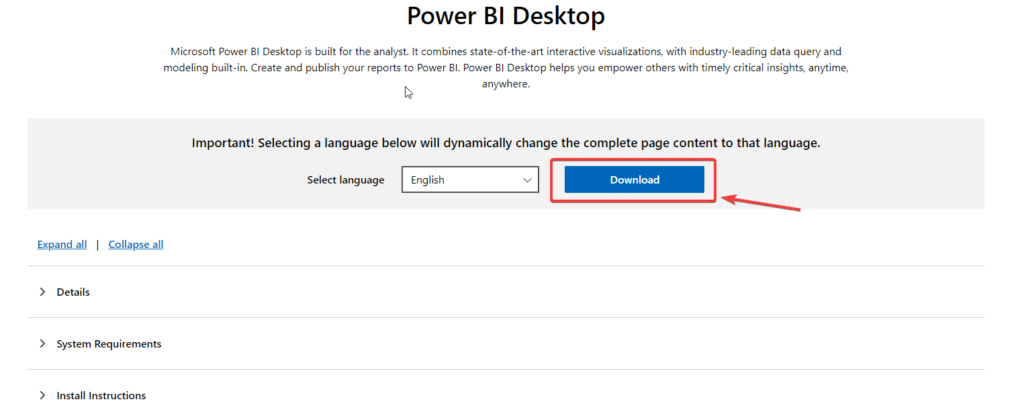
2. The Download page will open. Then click on the “Download” button.
3. A dialogue box will open. Select the desired file that is compatible with your system and click download. Your Power BI will start downloading into your browser.
Can You Download Power BI Desktop on Mac?
Power BI Desktop is currently only available as a native application for Windows. Microsoft has not released a standalone version for macOS, so if you’re working on a Mac, you have a few ways to still use Power BI:
Option 1: Run Windows via Virtual Machine
Install Windows on your Mac using a virtualization tool like Parallels Desktop, VMware Fusion, or Boot Camp, then download Power BI Desktop as you would on any Windows PC, following the steps above.
Option 2: Use Power BI Online (Power BI Service)
If you’d rather not run Windows, you can access Power BI directly through your browser at app.powerbi.com. This lets you view, edit, and share reports online without installing anything — though some Desktop-only features like advanced data modeling won’t be available.
Option 3: Remote Desktop into a Windows Machine
Connect remotely to a Windows PC or virtual machine where Power BI Desktop is already installed, and build your reports from there.
Not sure which option fits your team? Get in touch with our Power BI experts for the right setup for your environment.
Sign In to Power BI Desktop
Once installed, open Power BI Desktop and sign in with your Microsoft work or school account. This connects your Desktop app to Power BI Online, so you can publish reports directly to your workspace and collaborate with your team.
- Launch Power BI Desktop.
- Click Sign In in the top-right corner of the Home ribbon (or on the welcome screen).
- Enter your Microsoft work, school, or personal account credentials.
- Once signed in, you’re ready to connect to data sources and start building reports.
Already running Dynamics 365 Business Central or F&O? Explore pre-built Power BI connectors made for your ERP.
1. Is Power BI Desktop free to download?
Yes, Power BI Desktop is free to download and install on Windows, with no license fee for the application itself. You can connect to sources such as Excel, SQL Server, and Business Central, build reports, and create dashboards at no cost. A paid Power BI Pro license, priced at $14 per user per month as of 2026, is only required to publish and share reports through Power BI Service.
2. What is the difference between Power BI Desktop and Power BI Service?
Power BI Desktop is the free Windows application used to connect data, build data models, and design reports and dashboards. Power BI Service is Microsoft’s online platform for publishing, sharing, and collaborating on those reports. The typical workflow is to build in Desktop and publish to the Service. Desktop works offline, while Power BI Service requires an internet connection and a Microsoft account.
3. Can I download Power BI Desktop on a Mac?
Power BI Desktop does not have a native macOS version as of 2026. Mac users can run Windows through virtualization software such as Parallels Desktop or VMware Fusion and install Power BI Desktop within Windows, or use Power BI Service through a web browser without installing Desktop. Users who only need to view and interact with published dashboards can generally use Power BI Service directly on a Mac.
4. What should I do after downloading Power BI Desktop?
After downloading Power BI Desktop, connect it to your business data, such as Excel, SQL Server, or Dynamics 365 Business Central. From there you can create a data model, build reports and dashboards, write DAX measures, and develop interactive business intelligence solutions.
5. Do I need a Power BI Pro licence to use Power BI Desktop?
No. Power BI Desktop is free, and no Power BI Pro license is required to create reports and dashboards for your own use. A Power BI Pro license costs $14 per user per month as of 2026 and is generally required when publishing and sharing reports through shared workspaces in Power BI Service. For personal report development and learning, Power BI Desktop alone is sufficient
Conclusion
In this article, you have been given a step-by-step guide on how you can download by following any of the above methods.
Preferred method to download is from Microsoft Store because updates of Power BI will be downloaded automatically if you get it from Microsoft Store while you have to manually download updates if you download from your browser.
Need to learn more about Power BI, opt for our training programs for better analysis and advanced visualization today.


