Global Data 365

microsoft dynamics 365 customization

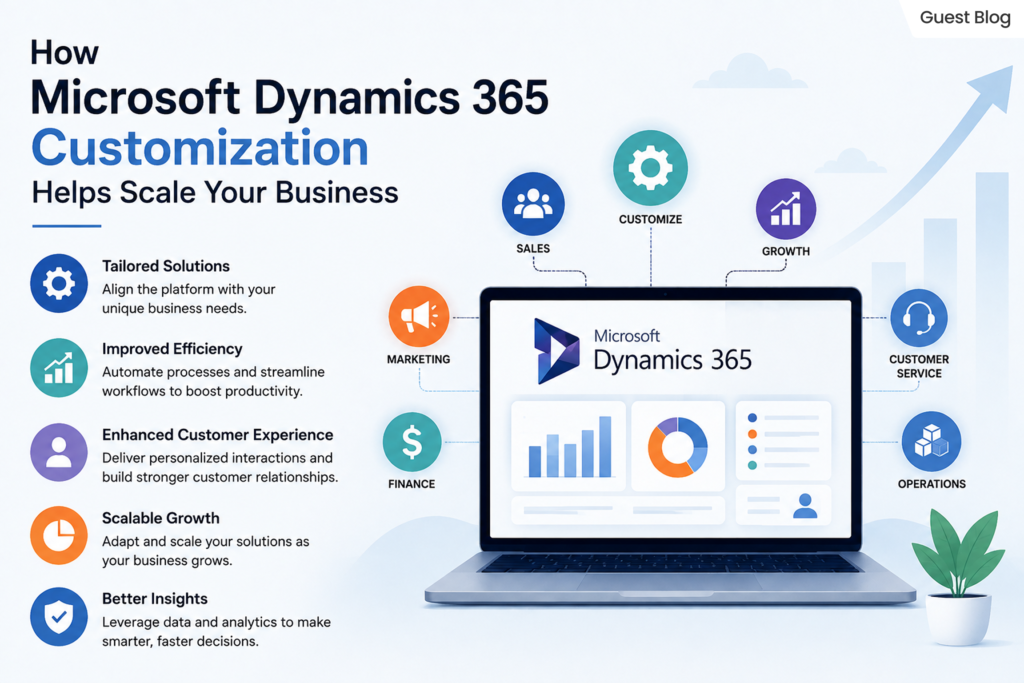
How Microsoft Dynamics 365 Customization Helps Scale Your Business?

microsoft dynamics 365 customization

Every market presents its own unique set of problems. MS Dynamics 365 provides guidance and solutions for many business areas, including customer service and operational resource management. Executing every aspect of your business and managing your procedures at scale is unfeasible with the features Dynamics 365 offers out-of-the-box customization. The strength of MS Dynamics 365 lies in its customizability. With Dynamics 365, you don’t have to press your business and your people into the processes of the software. Instead, the software assists your current workflow and processes.

Advanced Microsoft Dynamics 365 Customization Services provide automation, integrate with almost any software and provide your employees with advanced tools. Most importantly, these services help your employees make data-driven decisions. We will explore the extent of Dynamics 365 customization, the specific ways customization supports your business and additional tips and tricks to help you maintain success long after implementation of customization services.

What Is Microsoft Dynamics 365 Modification

Microsoft Dynamics 365 Customization modifies and improves the system to align to an organization’s needs, while keeping the core working. 


Customization can include: 

  • Creation of custom entities and fields 
  • Design of custom dashboards
  • Implementation of workflow automation
  • Creation of business rules 
  • Design of applications using Microsoft Power Platform 
  • Integration of third-party applications
  • Alteration of forms and reports 
  • Establishment of role-based user experiences 

Why Businesses Need Dynamics 365 Customization

Not two companies have the same way of running their business. There is always a unique way of having approval processes, sales cycles, reporting structures, and customer service processes.

On the other hand, the absence of customization may lead to:

  • Need to enter data manually 
  • Performing tasks repetitively 
  • Having ineffective work processes 
  • Having limited reporting capabilities 
  • Not having the application adopted 
  • Having challenges in growing the activities of the organization 

Customization of Dynamics 365 addresses these concerns by tailoring the software to the techniques of the business process instead of the business process adapting to the software’s restraints.

Benefits of Advanced Microsoft Dynamics 365 Customization Services

  • Unique Business Processes:  
    Customized Dynamics 365 services stretch the platform to your unique workflows and adapt the solution to your business instead of expecting process changes. 
  • More Productivity:  
    Custom workflows, forms and dashboards help employees be more efficient by ensuring employees only perform high-value work. 
  • Better User Experience:  
    Role-relevant data and features personalize dashboards. This leads to high adoption and low training times. 
  • Effortless Integration:  
    Dynamics 365 Customization allows effortless integration of Microsoft products and applications. 
  • Supports Digital Transformation:  
    Dynamics 365 Digital Transformation allows for smooth operations, better cross-departmental collaboration and automated business process management. Your organization becomes more flexible and more fit for competition. 

Primary Areas of Microsoft Dynamics 365 Customization


1. Custom Entities 

Create custom entities to store proprietary data for your business that are not included in other Dynamics 365 modules. 


2. Forms and Fields Customization 

Tailor presentation and input forms for users. 


3. Workflow Automation 

Eliminate common, burdensome tasks, approvals, and process requests, and receive alerts when reasoned. 


4. Dashboards and Reports 

Measure your business using dashboards and reports customized to track and display the metrics that matter to your organization. 


5. Third-Party Fusion 

Integrate Dynamics 365 with other corporate demands including Microsoft 365, Power BI and ERPs. 


6. Role-Based Security 

Manage what types of data users have access to based on what they are responsible for in the business. 


7. Power Apps and Power Automate 

Expand Dynamics 365’s capabilities, by developing your own apps and automating flows, respectively. 

Dynamics 365 Digital Transformation Through Customization

Optimizing processes and transforming customer experience is as important as adopting new technology for digital changes. 


Dynamics 365 Digital Transformation empowers businesses to:- 


  • Transform work processes 
  • Unify enterprise data 
  • Nurture customer relationships 
  • Create business process transparency 
  • Stimulate collaboration 
  • Work with distributed teams. 

Customization is important so that digital initiatives reflect your business versus process requests resulting from inflexible software.

Microsoft Dynamics 365 Customization for Business Growth

As organizations expand, so do their method, customer needs, and working needs. Microsoft Dynamics 365 Customization for business growth facilitates the unique adaptability required. The flexibility in Dynamics 365 incorporates the benefits of enhanced efficiency, improved collaboration, and scaling. Through customizing the workflow, automating procedures, and the integration of applications, companies are able to enhance their productivity in order to satisfy the demands of the market. Flexible solutions can maximize the value of an investment and can lead to sustainable growth for companies.

Customization of Dynamics 365 supports business growth in several ways:

  • Automating business processes to increase efficiency and reduce the need for formulaic processes
  • Improving customer satisfaction and loyalty by providing tailored and expedited services
  • Increasing productivity by means of personalized dashboards, forms, and workflows 
  • Syncing with Microsoft 365 and Power BI as well as ERP and other third-party applications 
  • Providing the ability to bring together data and teams to drive the company business forward 
  • Facilitating the expansion of Dynamics 365 business operations to support modern and flexible business functions in a digital age. 

Best Practices for Dynamics 365 Customization

If companies implement these strategies to Microsoft Dynamics 365 Customization, they will improve the efficiency and the capacity of their systems as well as enhancing the efficiency in maintenance of the system. When they focus on these components, businesses are able to optimize their investment and minimize problems that might occur in the near future. 


It is essential to determine the goals your company wants to accomplish, and then customize it in the Dynamics 365 system to that final goal. 


Second, try to use Dynamics 365 as is. Customizations, if necessary, should be the last resort. Since customizations increase the complexity of your system, it can be harder to maintain. 


Third, if you have a growing organization, plan for the growth by ensuring your customizations will support that growth. 


Fourth, efficiency of your users should be the focus. Dynamics 365 incorporates many automation features, workflows and processes. These should be designed in a way that users automatically use them. 


Finally, and most importantly, do thorough testing to validate your customizations before you roll them out to your team and lose your sanity if your system fails. 

Picking the Right Advanced Microsoft Dynamics 365 Customization Services

Selecting a trusted tailor-made partner is vital to the success of your project. 


Choose a provider who provides:- 

  • Certified Microsoft Dynamics experts 
  • Experience in the industry 
  • End-to-end implementation 
  • Integration capabilities 
  • Security best practices 
  • Support and maintenance on a regular basis 
  • Optimization of performance 
  • Training for users 

The ideal partner will align your technical abilities with your business aim and will ensure that you have a Dynamics 365 environment that will continue to evolve as your company expands. 

Common Mistakes to Ignore

Dynamics 365 Customizations fail to achieve what they set out to do because of the following common mistakes:- 

  • Over-customization without defined business value 
  • Paying no attention to future business growth 
  • Forgetting to train users 
  • Not keeping track of customizations 
  • No validation to assess whether customizations are ready for production 
  • Multiple workflows that accomplish the same task 
  • Inefficient use of a secure system 

Not avoiding these will cause an inefficient Dynamics 365 system. 

Common Challenges Solved by Microsoft Dynamics 365 Customization

A majority of businesses have issues with unreliable workflows and systems that are not accessible as well as inaccessibility to business processes. Microsoft Dynamics 365 Customization addresses these issues by tailoring the platform to meet your needs as a company, increasing productivity while enhancing the user experience. 

Common problems solved by customization can include: 


  • Manual and repetitive tasks can be automated through workflow automation. 
  • Business applications that are disconnected and seamless integrations with third party applications. 
  • Limited reporting capabilities with customized Dashboards as well as real-time Analytics. 
  • Complex user interfaces are created by creating form-based and interactive dashboards. 
  • Inconsistencies in data with custom validation rules or standardized procedures. 
  • Problems with scaling can be solved by changing the platform to accommodate the growth of businesses. 

Future Trends in Microsoft Dynamics 365 Customization

Technology is constantly changing; Microsoft Dynamics 365 Customization is changing to become more sophisticated and automated, and also fully automated and data-driven. Companies are embracing new technologies to boost efficiency, improve customer service and accelerate the speed in Dynamics 365 Digital Transformation. 

The most important patterns that will define the direction of are:- 

  • AI-powered automation increases the effectiveness of business processes and increases the quality of decision-making. 
  • Development without code and low-code with Microsoft Power Platform. 
  • Predictive analytics can assist in improving the planning and forecasting of business operations, as well as management of business. 
  • Cloud-native modifications allow for more capacity and greater flexibility. 
  • Advanced integration of data with Microsoft Fabric and Power BI. 
  • Specific to the industry, Microsoft Dynamics 365 Solutions tailored to specific business needs. 

ROI of Microsoft Dynamics 365 Customization for Growing Businesses

The investment in Microsoft Dynamics 365 Customization for business growth can yield tangible results by enhancing process efficiency, reducing manual labor, and enhancing satisfaction of customers. Customized solutions help companies make the most of their resources, increase productivity, and expand their capabilities in the course of time. 

The most important ROI benefits are: 

  • Lower operating costs by automating workflows. 
  • Improved productivity of employees through personalized processes and interfaces. 
  • More efficient decision-making with the latest dashboards, analytics, and real-time data. 
  • Increased customer satisfaction through personal interactions. 
  • Scalability that can support the growth of business operations.  

More efficient use and better utilization of Microsoft Dynamics 365 Solutions by aligning the platform with the goals of the business.

In Conclusion

Microsoft Dynamics 365 Customization offers an end-to-end solution for exploiting the efficiency of business operations and boosting productivity. By utilizing Advanced Microsoft Dynamics 365 Customization Services, companies can design automated processes, improve usability, and implement solutions that are scalable. Through the proper modifications, companies can increase the capabilities of Dynamics 365 and advance their digital transformation strategies and long-term growth strategies for their business.

Ready to transform the way your enterprise operates?

Share this blog on:

Search Blog

About Us

Global Data 365 is composed of highly skilled professionals who specialize in streamlining the data and automate the reporting process through the utilization of various business intelligence tools.

Follow us on:

Still using Jet Basics?

Get Free Upgrade
to Jet Reports

jet services

Subscribe to Our Newsletter

How Microsoft Dynamics 365 Customization Helps Scale Your Business Read More »
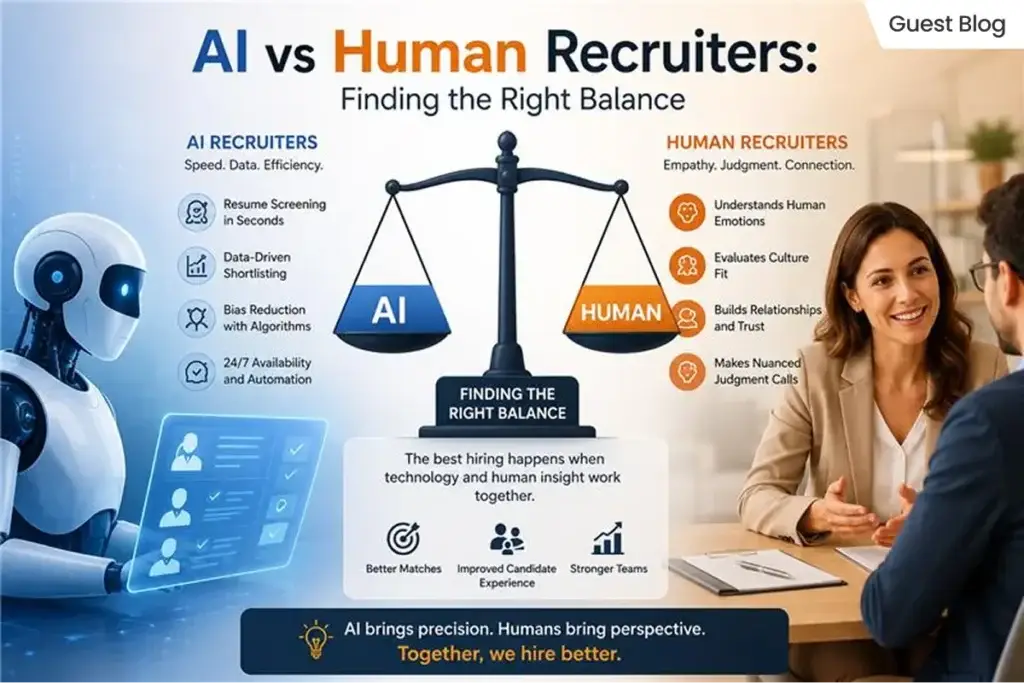
ai vs human recruiters

AI vs Human Recruiters: Finding right balance

ai vs human recruiters

Your resume probably reached a computer before it reached a person. Most companies now run applications through AI-powered recruitment systems, screening applications the moment they come in before a recruiter reviews them. If the match isn’t strong enough, a recruiter may never see it at all. 


But that’s only half the process. Once you clear that first filter, AI steps back and a human takes over; reading your background, judging fit, and making the actual hiring call. Getting through both stages means understanding what each one is actually looking for, and that’s exactly what this guide walks through. 

What Happens Before A Human Sees Your Resume

An Applicant Tracking System, or ATS, reads your resume the moment you hit submit. It pulls out your skills, job titles, and experience, then compares all of it against the job description to produce a match score. Organizations often combine ATS platforms with HR reporting dashboards to monitor recruitment performance, application volumes, interview pipelines, and hiring efficiency. No one has looked at your resume yet; the software has already decided whether it’s worth passing along. 


This isn’t a small-company habit either. Over 90% of large employers now use some form of ATS, and AI use across recruiting has nearly doubled between 2024 and 2026. If you’re applying to a mid-size or large company, you’re almost certainly being scored before being read.

The match number that actually matters

Data from resume-tracking research points to a 75% keyword match against the job description as the sweet spot for getting callbacks. Go lower, and the system may rank you below candidates who used the employer’s exact language. Go too high, close to a 100% match, and it can look like the resume was copied straight from the posting, which raises flags instead of scores. 


A CV maker can help here too, giving you a format that’s already built to parse cleanly, so you’re not guessing whether your layout works against you before the content even gets read. 


Behind these screening processes, hiring teams rely on HR analytics to understand which job postings, keywords, and recruitment channels attract the strongest candidates.

Why A Person Still Makes The Final Decision?

Once your resume clears the screening stage, the process stops being about scores. A recruiter reads how you communicate, how you talk through your experience, and whether you’d work well with the team you’d be joining. None of that shows up in an ATS report. 

What AI simply can't judge?

Cultural fit, tone in an interview, how you handle a tough question on the spot, and back-and-forth during salary negotiation all come down to human judgment. AI can rank a resume, but it can’t sit across from someone and get a feel for how they’d actually work day to day. 


This is the part worth remembering: AI narrows a large pile of applicants down to a manageable shortlist. A person decides who actually gets hired. Passing the algorithm gets you in the room. What happens after that is entirely on you

The Hiring Process - Who's In Charge At Each Stage

Here’s the same idea laid out plainly, so you can see exactly where each side of the process takes over: 

Task 

Who handles it 

Resume/CV scanning 

AI 

Keyword and skill matching 

AI 

Interview scheduling 

AI 

Cultural fit judgment 

Human 

Final hiring decision 

Human 

Negotiation 

Human 

The pattern is simple: AI handles the volume and the sorting, a person handles the judgment calls. Knowing which side you’re dealing with at each stage changes how you should prepare for it. 


Many organizations visualize these recruitment stages using HR KPI dashboards, making it easier to monitor hiring pipelines, recruiter performance, and time-to-fill metrics. 

Tips To Pass Both AI And Human

A few practical habits make the difference at both stages, without turning your resume into a keyword-stuffed mess. 


Keep the formatting simple, Stick to a single column, standard fonts and clear section headings. Fancy templates with graphics or multiple columns often get misread or scrambled by ATS software, even if they look great to a human eye.

Match the job, not just your career

Tailor your resume for each role instead of sending the same version everywhere. Pull the exact terms the employer uses in the job description, skills, tools, job titles, and use them where they genuinely apply to your experience. 

Lead with a short summary

A three or four line summary at the top, listing your role, core skills, and experience level, helps both the AI and the recruiter reading it afterward understand your fit in seconds. 

Get the structure right if you're not sure

If you’re not confident building this layout from scratch, a reliable CV maker can keep your formatting clean and ATS-safe while you focus on getting the content right. It’s a practical shortcut, not a replacement for tailoring the content yourself. 

Your Profile Works Even When You're Not Applying

Help with your LinkedIn profile is worth considering even if you’re not actively job hunting, since recruiters are searching it directly using AI, often before anyone has applied. Close to half of employers now use AI this way, pulling talent straight from social and professional profiles rather than waiting for job postings to bring candidates in.

What this means for you?

If your profile is outdated or thin on detail, you could be skipped over for roles you’d never even hear about. The same principles from your resume apply here: clear skills, specific experience, and language that matches how recruiters actually search.  


Worth getting a second opinion, someone who knows what recruiters and search tools look for can make sure your profile reads well to both. Since it’s doing work in the background at all times, it’s worth getting right rather than leaving it as an afterthought. 

When To Bring In Outside Help

Sometimes the problem isn’t your experience, it’s how it’s being presented. If you keep getting filtered out at the resume stage and can’t pinpoint why, that’s usually a sign you need a second set of eyes rather than another rewrite on your own. 


At this point, a resume writing service online can be a realistic option, not because your background isn’t strong enough, but because someone who understands how ATS systems and recruiters read resumes can spot what’s holding yours back. It’s a practical fallback when you’ve tried the basics and the callbacks still aren’t coming.

Frequently Asked Questions

How are recruiters using AI in hiring?

Mostly for the repetitive parts: screening resumes, matching keywords to a job description, scheduling interviews, and answering candidate questions through chatbots. The final decisions still sit with a person. 

Yes. If your resume scores too low against the job description, an ATS can filter it out before a recruiter opens the file. This is why tailoring your resume to each role matters. 

Not on its own. AI can help you draft or organize content, but recruiters can usually tell when a resume sounds generic. The strongest resumes still contain your real experience, specific results, and honest detail. 

It’s widely used and generally accepted, but it comes with responsibility. Companies are expected to keep a human reviewing final decisions and to check their AI tools regularly for bias, rather than letting the software decide alone. 

Automated scheduling emails, chatbot replies to your questions, or an early “screening call” that feels scripted are usually signs AI is involved at that stage. A later interview with a real person is where human judgment takes over. 

Getting The Balance Right

AI and human recruiters aren’t competing for control of your application. They’re just handling different parts of it. One sorts and scores, the other reads and decides. Once you know which one you’re writing for at each stage, the rest becomes far less confusing. Get the formatting and keywords right for the algorithm, then let your actual experience and communication do the work once a person is reading. 

Talk to our expert today.

Share this blog on:

Search Blog

About Us

Global Data 365 is composed of highly skilled professionals who specialize in streamlining the data and automate the reporting process through the utilization of various business intelligence tools.

Follow us on:

Still using Jet Basics?

Get Free Upgrade
to Jet Reports

jet services

Subscribe to Our Newsletter

AI vs Human Recruiters Read More »

Microsoft Power BI Consulting services

Why Microsoft Power BI Consulting Is Essential for Modern Enterprise Analytics

Microsoft Power BI Consulting services

Modern businesses generate wide volumes of data each day. From sales and customer interactions transactions, to financial records and operational metrics, businesses have access to more data than ever. However, raw data alone does not create value. Companies need the right techniques, tools, and expertise to transform data into valuable data. This is the reason Microsoft Power BI consulting services have become essential. As companies move into the digital era and require Analytics solutions that are scalable and safe to utilize. While Microsoft Power BI is one of the most efficient business intelligence tools however, its use requires expertise in technical aspects and strategic thinking.


Microsoft Power BI consulting helps businesses make the most of the power of the platform. It can deliver faster report-writing, more effective decision-making, and better ROI on technology.


If you’re a global company or an organization that is growing, professional consultants can tailor Power BI to suit your goals in business and provide useful information across all departments.

What Are Microsoft Power BI Consulting Services?

Microsoft Power BI consulting services include expert advice for designing and implementing, customizing, and enhancing Microsoft Power BI. Consultants assist businesses in creating interactive dashboards and automating reports, connecting different data sources, and create governance guidelines to improve the quality of data and security. 


They go beyond making reports. Consultants review your company’s goals along with your current systems and the data infrastructure in order to design an integrated analytics strategy which will support long-term growth. 

Common consulting services include:

  • Power to implement and deploy BI
  • Transformation and modeling of data
  • Development of dashboards and reports
  • Integration of data warehouses
  • Cloud connectivity and on-premises connectivity
  • Governance and Security configuration
  • Optimization of performance
  • Training and support for users

Why Modern Enterprises Need Power BI Consulting?

The modern business world is characterized by highly competitive markets where fast decision-making based on data is essential. Business leaders require immediate visibility into customer behavior, operations, financial performance, customer behavior, as well as market developments. 


If they do not have a competent implementation, businesses typically face the following challenges: 

  • Disconnected data sources
  • Inconsistent report
  • Analyzing spreadsheets manually
  • Slower production of reports
  • Poor dashboard performance
  • Limited user adoption
Power BI consulting for enterprises solves these issues by creating an integrated analytics system that connects all business information.

Consultants assist organizations in:

  • Establish enterprise-wide reporting standards
  • Connect ERP and HRMS, CRM, and cloud applications
  • Automate the recurring report
  • Improve collaboration across departments
  • Allow self-service analytics
  • Ensure that you are in compliance with the security policy

Key Benefits of Microsoft Power BI Consulting for Businesses

The benefits of Microsoft Power BI consulting for business go beyond the creation of dashboards. Expert consultants assist businesses in implementing advanced analytics that increase the efficiency of their decision-making and effectiveness.

  • Customized Business Intelligence for Businesses:
    Customized dashboards and reports that are designed specifically for your business’s goals and objectives as well as KPIs.
  • Real-Time Insights:
    Get access to live information and dynamic visualizations to aid in better, faster decision-making based on data.
  • Seamless data integration:
    Connect various sources of data, such as ERP, CRM, and cloud-based platforms and databases, into one unifying view.
  • Automation:
    Improve Productivity Automation of manual reporting processes and allow teams to concentrate on more strategic work instead of making data.
  • Scalable Analytics:
    Microsoft Power BI consulting will ensure that your analytics solution expands to meet the needs of your business.
  • Improved Data Security:
    Install the role-based access system as well as governance and security measures to safeguard confidential business data.
  • Better Collaboration: Share interactive dashboards across departments to increase the transparency of business decisions and ensure they are aligned.

Microsoft Power BI Outcomes for Modern Enterprises

Modern companies require analytics platforms capable of handling massive amounts of data without compromising speed. Microsoft Power BI solutions for modern enterprises offer the latest capabilities, including:


  • Enterprise Reporting:  
    Businesses can generate automated reports which are updated in real time without manual intervention.
  • Executive Dashboards: Teams of leaders get immediate information about the company’s execution through interactive dashboards.
  • Predictive Model:   
    Power BI integrates with AI and machine learning models to identify designs, forecast results, and help with strategic planning.
  • Financial Intelligence:  
    Finance departments can track the profitability, revenue, expenses, and cash flow with central dashboards.
  • Operational Analytics:  
    Operations teams gain insight into the efficiency of production and supply chain performance and the utilization of resources.
  • Customer Analytics: Sales and marketing teams study customer behavior, the effectiveness of campaigns, and buying trends to increase the efficiency of their industry. 

Power BI Consulting for Enterprises: Best Practices

The success of implementation is more than simply installing software. Professional consultants adhere to the most effective methods.

1. Understand Business Objectives

Consultants start by identifying organizational goals prior to designing dashboards. The goal is to ensure that the reports meet the business goals.

2. Build a Strong Data Foundation

Clean, organized, and consistent data is vital to ensure accurate reporting. Consultants create right data models to improve the accuracy of information.

3. Plan User-Friendly Dashboards

Visualizations must be simple to comprehend. A professional dashboard design can increase the efficiency and adoption of users.

4. Optimize Performance

Big data sets can affect the speed of dashboards. Consultants improve queries, data models and refresh schedules to boost efficiency and optimize the performance of power bi.

5. Enable Self-Service Analytics

Employees must be able to make reports without the need of IT departments. Consultants should apply self-service capabilities while keeping a sense of governance.

6. Provide Ongoing Help

The business requirements change as time passes. Continuous improvement makes sure that Power BI remains aligned with the evolving needs of the organization.

Power BI Consulting for Small Businesses

Power BI consulting for small businesses allows growing companies to benefit from enterprise-level analytics without large infrastructure investment.

Small businesses gain from:

  • Solutions for affordable reporting
  • Automated dashboards for business
  • Sales performance tracking
  • Reports on inventory management
  • Customer insights
  • Financial monitoring
  • Cloud-based access

Common Challenges Solved by Power BI Consultants

No matter if you’re a big enterprise or seeking Power BI consultation for small businesses, our experienced consultants will help you solve common issues, such as:

  • Incorporating data from various sources into one dashboard.
  • Automated reporting replaces manual reports with real-time reports.
  • Enhancing the efficiency of dashboards and accuracy of data.
  • Secure access control and policies for governance.
  • Designing solutions that can scale according to the needs of business.
  • Enhancing user adoption with intuitive dashboards and education

Industries That Benefit from Microsoft Power BI Consulting

Microsoft Power BI solutions for modern enterprises allow companies across all industries to transform complicated data into actionable insights to enhance the quality of their decision-making.

Health: Monitor the outcomes of patients in terms of resource utilization, patient outcomes, and operational effectiveness.

Manufacturing: Monitor performance of production, inventory levels, production performance, and maintenance of equipment.

Retail and E-commerce: Study the behavior of customers, trends in sales, and inventory management.

Financial Services: Increase the financial reporting process, risk management, financial reporting, as well as regulatory compliance.

Education: Assess the performance of students, trends in enrollment, and operational efficiency of the institution.

Logistics & Supply Chain: Enhance the performance of your fleet, warehouse operations, logistics, and the efficiency of delivery.

Professional Services: Track the progress of projects, allocation of resources, and the business’s profitability.

Choosing the Right Microsoft Power BI Consulting Partner

Finding the right Microsoft Power BI consulting partner is vital to creating efficient analytics solutions that meet your company’s goals. A reputable consulting company will not only assist with the implementation but also guarantee data security, accuracy, as well as scalability and long-term performance. The ideal partner will be able to provide technical expertise as well as industry knowledge and a deep understanding of your company’s needs.


The most important aspects to take into consideration are:

Power BI Expertise: Choose a partner with knowledge of Power BI development, dashboard creation, data modeling Analytics solutions, and data modeling.

Industry Expertise: Choose consultants who are familiar with your industry’s issues and provide relevant business insight.

Data Integration Skills: Make sure the service provider is able to integrate Power BI with multiple platforms such as databases, as well as enterprise systems.

Security and Governance Expertise: Find out about expertise in the implementation of secure access controls as well as the management of data practices.

Customization capabilities: A trustworthy partner should provide customized solutions, not generic dashboards.

Support Continually: Select a consultant who offers regular maintenance, optimization, and user education.

Conclusion

In today’s constantly changing business environment, the increasing need for data-driven decisions is vital for sustained growth. Microsoft Power BI consulting services help businesses transform complex data into useful insights by using customized dashboards and visuals, which include advanced analytics as well as powerful reporting solutions. With the assistance of experts, businesses can increase efficiency, enhance transparency in operations and make wise decisions. It doesn’t matter if it’s a huge business or growing; investing in expert Power BI consulting enables organizations to realize the full power of data and remain ahead in the age of digital.

Ready to transform the way your enterprise operates?

Share this blog on:

Search Blog

About Us

Global Data 365 is composed of highly skilled professionals who specialize in streamlining the data and automate the reporting process through the utilization of various business intelligence tools.

Follow us on:

Still using Jet Basics?

Get Free Upgrade
to Jet Reports

jet services

Subscribe to Our Newsletter

Why Microsoft Power BI Consulting Is Essentials for Modern Enterprise Analytics? Read More »

Power BI for Business Central Reporting

How Power BI Enhances Microsoft Dynamics 365 Business Central Reporting

Power BI for Business Central Reporting

Having accurate financial data is necessary but understanding what that data actually means is what drives a company forward. Microsoft Dynamics 365 Business Central serves as a powerful tool for tracking your inventory, vendor payments, and daily cash flow. Yet, trying to identify growth opportunities by staring at endless rows of numbers will be a little difficult for any business owner.  In this context, Power BI unlocks the true potential of your ERP data. This dedicated analytics tool connects directly to your Business Central data to produce clear, colorful visual metrics. It helps your team gain instant clarity to spot trends and fix hidden issues.  


Throughout this blog, let us look at the specific technical features, the practical aspects, and how this visual tool upgrades your data strategy and enhances your daily business reporting. 

How Power BI Connects Natively to Business Central Data

In the past, connecting an ERP system to a visual reporting tool required significant technical work. IT departments had to write custom scripts to get data, or finance teams had to export CSV files manually every single week. This meant business reports were always delayed. Because Microsoft developed both of these platforms, they share a unified technical environment. Power BI uses pre-built API connectors to link directly to your Business Central database. You do not need to hire programmers to build a custom bridge.  


Once the connection is authorized, the business intelligence platform automatically refreshes your data based on a schedule you define. You can configure the system to refresh your financial dashboards every morning or even multiple times throughout the day. 


With data automatically syncing, accountants no longer need to export and consolidate reports manually.  

Using Power BI Interactive Visuals to Replace Static Reports

A standard financial report generated directly from an ERP is usually a static document. It only displays a fixed set of numbers. If a manager reviews a static sales report and sees a sudden drop in revenue for a specific product line, the report cannot explain the reason behind the drop. The manager has to request a completely new document to investigate the issue. 

Power BI avoids these hassles with interactive visual workspaces. The software features a function called cross-filtering. If you look at a digital dashboard containing a revenue bar chart, a regional map, and a list of top customers, these visuals work together dynamically.  


When you click on a specific product category in the bar chart, the regional map instantly updates to show where that specific product is selling. The customer list also shifts to display only the buyers who purchased that item. This drill-down capability allows any user to filter data intuitively and find the root cause of a business trend in seconds. 


While this level of interaction makes internal accounting and ERP data highly powerful to explore, a complete business view cannot depend on ERP data alone. Much of the essential information also comes from external sources that work outside the core accounting system. However, valuable business insights often require data beyond the ERP system itself.  

How Does Power BI Blend External Data With Business Central Ledgers?

Your ERP platform is the financial core of your company, but it rarely holds every piece of operational data. Some companies use separate software applications for email marketing, customer relationship management and website analytics. Keeping these data sets separated creates blind spots for the management team. You cannot easily see how your marketing efforts affect your actual sales. 


Power BI acts as a central hub that can blend data from hundreds of different external sources. It allows you to build a single data model that combines your Business Central ledgers with information from outside platforms. 


For instance, you can import your monthly digital advertising spend from a marketing tool and display it directly next to the invoiced sales data provided by your accounting software. By viewing the marketing costs and the resulting revenue on the exact same screen, your management team can accurately calculate the return on investment for their advertising campaigns. Blending multiple data sources provides a complete view of company performance. 


Once these different data sources are unified, you get a clear and reliable view of current business performance. The next step is to go beyond understanding the present and start using this combined data to anticipate future outcomes.  

Leveraging Power BI Predictive Analytics for Financial Forecasting

Reviewing historical sales data is necessary for compliance, but predicting future cash flow is what actually keeps a business secure. Doing manual forecasting using spreadsheets is incredibly difficult. It requires complex formulas and a lot of guesswork regarding seasonal trends and customer payment habits. 


Power BI includes built-in predictive analytics and forecasting algorithms that take the guesswork out of planning. The tool analyzes the historical data stored inside Business Central to identify hidden patterns. 


You can apply a forecasting feature to a standard line chart tracking your monthly revenue. The system will look at your past performance, factor in seasonal dips and draw a projected path for the upcoming quarter. It even displays a shaded confidence interval to show the high and low estimates of the prediction. This feature helps procurement managers identify inventory consumption trends and support replenishment planning when relevant operational data is available. This gives them enough time to place new vendor orders before a stockout occurs. 


While forecasting strengthens planning for inventory and cash flow, its value is maximized only when these insights are distributed throughout the organization with proper security controls. 

Securing Your Reports With Power BI Row-Level Security

Distributing financial reports always presents a security challenge. Sending Excel files through email or printing out physical packets makes it very easy for sensitive organizational data to be leaked or accessed without permission.  


Power BI solves this administrative burden through a feature known as Row-Level Security. This security feature allows your IT team to create a single master dashboard for the entire company. 


When an employee logs into their online portal or mobile app, the system checks their identity. It then filters the data on the dashboard based on their specific security clearance. A regional sales manager can open the dashboard and only see the revenue figures for their specific territory. The overall corporate totals and the data for other regions remain completely hidden.  


This lets you distribute powerful reporting tools across your organization without compromising data privacy. 


Beyond secure access, Power BI dashboards are available through web browsers, tablets, and mobile devices. This allows executives, finance teams, and department managers to monitor key performance indicators, review financial metrics, and respond to operational issues even when they are away from the office. Having access to critical business insights from anywhere helps decision-makers stay informed and act quickly when circumstances change. 

Wrapping Up

The main goal of any accounting system is to clearly show where your business stands at any point in time. Microsoft Dynamics 365 Business Central  captures and records financial details with precision, while Power BI turns that raw data into clear, visual insights that are easy to understand at a glance and use for better decision-making. 


When these two systems work together, it removes the need for repeated manual data exports and keep reporting continuously up to date. It also allows you to combine internal financial data with external sources like marketing performance, giving a more complete picture of business performance and enabling more accurate cash flow forecasting. For management teams, this creates a stronger ability to plan ahead with confidence rather than react after the fact. 


At the same time, row-level security ensures that each user only sees the data relevant to their role, protecting sensitive information without limiting access to insights. With this combination of real-time visibility, integrated data, and controlled access, teams can quickly identify small issues early and address them before they grow into costly problems. 


Ready to transform your business central reporting?

Share this blog on:

Search Blog

About Us

Global Data 365 is composed of highly skilled professionals who specialize in streamlining the data and automate the reporting process through the utilization of various business intelligence tools.

Follow us on:

Still using Jet Basics?

Get Free Upgrade
to Jet Reports

jet services

Subscribe to Our Newsletter

Power BI for Microsoft Dynamics 365 Business Central Reporting Read More »

Field Parameters in Power BI

Global Data 365 Webinars

Watch Now: Why Power BI Breaks While Consolidating Multi-Company Data

Request your Free Demo

Complete the form below and a solutions expert will be in touch to schedule your personalized demonstration.

Watch Now Why Power Bi Breaks While Consolidating Multi-Company Data Read More »

Why Power BI Breaks while consolidating multi company data

Why Power Bi Breaks While Consolidating Multi-Company Data

Why Power BI Breaks while Consolidating Multi-Company Data? (Microsoft Dynamics 365)

Managing Power BI reporting across multiple companies in Business Central often becomes complex due to native integration limitations. In this session, we’ll explore how organizations can move beyond single-company reporting and build a scalable, consolidated reporting structure. You’ll learn the challenges of multi-company setups, the role of a data warehouse approach, and how to design unified Power BI dashboards that provide complete visibility across your business group.

This session is designed for teams looking to simplify reporting, reduce manual effort, and unlock real-time insights across all companies in one place.

Agenda

  • Multi-company reporting challenges in Power BI + Business Central and why native setup becomes limited
  • Common pain points like fragmented reports, manual consolidation, and lack of unified visibility
  • Scalable solution approach using data warehouse and centralized data modeling
  • Designing unified Power BI dashboards for group-level and company-level insights
  • Live discussion on real use cases, challenges, and practical implementation
Why Power BI Breaks while consolidating multi company data

Request your Free Demo

Complete the form below and a solutions expert will be in touch to schedule your personalized demonstration.

Why Power Bi Breaks While Consolidating Multi-Company Data Read More »

Field Parameters in Power BI

Field Parameters - Power BI

Field Parameters in Power BI – On-Demand Webinar


Learn how to make your Power BI dashboards smarter and more interactive! This recorded session shows you how to create a single visual that dynamically switches between multiple KPIs using Field Parameters.


In this webinar, you’ll learn:

  • What Field Parameters are and how to use them effectively

  • How to build dynamic visuals for insight-driven dashboards

  • Best practices for clean and professional reporting

  • Common mistakes to avoid

  • Watch the full Q&A with our expert trainer

Watch the full on-demand webinar and access resources here.

Field Parameters in Power BI

Request your Free Demo

Complete the form below and a solutions expert will be in touch to schedule your personalized demonstration.

Field Parameters in Power BI Read More »

Field Parameters in Power BI

Global Data 365 Webinars

Watch Now: Field Parameters in Power BI

Request your Free Demo

Complete the form below and a solutions expert will be in touch to schedule your personalized demonstration.

Watch Now Field Parameters in Power BI Read More »

Jet Analytics vs Microsoft Fabrics

Jet Analytics vs. Microsoft Fabrics: For Business Central

Jet Analytics vs Microsoft Fabrics

As organizations increasingly depend on data to drive smarter decisions, the tools used for data integration, reporting, and business intelligence are more important than ever. For users of Microsoft Dynamics 365 Business Central, two options often come into consideration: Jet Analytics and Microsoft Fabrics. But which one truly aligns with the needs of Business Central users, especially those looking for ease, speed, and clarity in reporting? Find the differences between Jet Analytics vs Microsoft Fabrics to find best fit for business central.

What is Jet Analytics?

Jet Analytics is a business intelligence solution built specifically for Microsoft Dynamics ERP systems, including Business Central and NAV. It combines pre-built OLAP cubes, a data warehouse, and visual ETL tools in an easy-to-use, Excel-integrated platform. At the core of Jet Analytics is the Jet Data Manager, which automates data extraction, transformation, and loading (ETL) without the need for heavy coding. 


Jet Analytics is designed for rapid deployment, self-service reporting, and minimal IT dependency, making it ideal for finance, operations and business teams that want quick access to accurate data. 

See how businesses profit from Jet Analytics: IKEA Case Study.

What is Microsoft Fabrics?

Microsoft Fabrics is a new unified analytics platform from Microsoft that brings together data engineering, data integration, data warehousing, data science, and real-time analytics, all within the Power Platform and Azure ecosystem. Utilizing expert Microsoft Fabric consulting services allows your team to seamlessly design, build, and manage these end-to-end data solutions. It allows users to build end-to-end data solutions using tools like Data Factory, Synapse, Spark notebooks, Lakehouses and Power BI


While powerful, Microsoft Fabric is developer-oriented and designed to support large-scale, complex data environments. It requires strong technical skills and an in-depth understanding of multiple tools across Azure and Power Platform. 

10 Key Differences for Business Central Users: Jet Analytics vs. Microsoft Fabrics

Now, let’s compare how Jet Analytics and Microsoft Fabrics differ in real-world scenarios for Business Central users. 

FeatureJet AnalyticsMicrosoft Fabrics
Business Central IntegrationNative, pre-built cubes and dimensionsManual setup required
Tabular Cube SupportOut-of-the-box cubes for BCCustom modeling via datasets
Data Warehouse CreationAutomated with Jet Data ManagerManual via pipelines & lakehouses
Ease of UseBuilt for business users, Excel-friendlyDeveloper-centric, steeper learning curve
Deployment Time1–2 weeks3–6 weeks or more
ETL ToolDrag-and-drop visual ETLCode-heavy tools (Data Factory, notebooks)
Licensing & CostSimple, fixed licensingUsage-based, potentially unpredictable
On-Premise CapabilityAvailableCloud-only
User Training & SupportGuided onboarding, strong partner ecosystemSelf-service or paid consulting required
Time-to-InsightsFast, business-ready out of the boxSlower setup and modeling process

1. Seamless Integration with Business Central

Integration is one of the most important aspects when selecting a BI solution. Business Central users need tools that understand their data model, business rules, and dimensions—without requiring complex setup or custom mapping. 

- Jet Analytics:

Jet Analytics provides deep, native integration with Business Central. It comes with pre-built cubes and ETL processes tailored specifically for BC data structures, enabling users to start generating reports quickly with minimal configuration. 

- Microsoft Fabrics:

Fabrics requires manual configuration of pipelines or Power BI dataflows to connect with Business Central. This adds time, complexity, and potential for errors during integration. 

2. Built-In Tabular Cube Support

Cubes provide structured, high-performance analytics for users needing fast, slice-and-dice reporting capabilities. The ease with which these cubes can be created and maintained is vital. 

- Jet Analytics:

Jet Analytics includes built-in tabular cubes with drag-and-drop measures and KPIs. These cubes are pre-configured for business users and offer seamless integration with Excel and Power BI. 

- Microsoft Fabrics:

Microsoft Fabrics supports tabular models through Power BI datasets, but requires custom modeling. Business Central users must build these datasets from scratch, increasing setup time and reliance on technical staff. 

3. Automated Data Warehouse Creation

A robust BI solution must include a flexible and scalable data warehouse. Automating the creation and maintenance of this warehouse saves time and reduces the need for ongoing developer involvement. 

- Jet Analytics:

Jet Analytics uses Jet Data Manager to automate data warehouse creation, manage historical data, and simplify maintenance. It eliminates the need for writing custom scripts or managing complex infrastructure. 

business central jet analytics warehouse creation
Business Central Reporting in Jet Analytics - Automated Data Warehouse
- Microsoft Fabrics:

Microsoft Fabrics requires setting up data pipelines, lakehouses, and notebooks, which are typically suited for data engineers and not business analysts. The manual nature of these components increases implementation complexity. 

4. Ease of Use for Business Users

An analytics platform is only valuable if the people who need insights can use it effectively. For many organizations, business users—not developers—are the primary consumers of data. 

- Jet Analytics:

It is built for non-technical users, with a familiar Excel-integrated experience that reduces training time and increases adoption. Users can build and modify reports without relying on IT. 

- Microsoft Fabrics:

Fabric is designed for technical professionals. It requires a solid understanding of Power Query, DAX, or Python, which limits its accessibility to business users. 

5. Faster Deployment Time

Time-to-value is a critical factor when implementing analytics. The longer it takes to get up and running, the longer the organization waits for actionable insights. 

- Jet Analytics:

With ready-made templates and native Business Central integration, Jet Analytics can be deployed in as little as 1–2 weeks. 

- Microsoft Fabrics:

Because Fabric relies on custom development, pipeline configuration, and modeling from scratch, it usually takes 3–6 weeks or longer to get operational. 

6. Visual ETL Tools

Transforming raw data into meaningful information should not require coding expertise. A visual ETL tool accelerates development and empowers non-developers to manage their data flows. 

- Jet Analytics:

Jet Data Manager includes a visual drag-and-drop interface for ETL/ELT processes, allowing users to manage transformations, lookups, historical tracking, and data cleansing without writing code. This simplifies data preparation and empowers business analysts to control their own pipelines. 

- Microsoft Fabrics:

Fabric requires the use of Azure Data Factory, Spark notebooks, or other developer-centric tools to build data pipelines. These tools offer flexibility but demand significant technical skills, making it unsuitable for business users or smaller teams lacking full-time data engineers. 

7. Licensing & Cost

Understanding the licensing model is crucial for budgeting and long-term planning. Solutions that include everything under a single license often result in a lower total cost of ownership. 

- Jet Analytics:

Jet Analytics provides a single license that covers Jet Data Manager, Jet Reports, and pre-built cubes, eliminating the need for multiple Azure services or unexpected usage-based costs. This makes budgeting and deployment more straightforward. 

- Microsoft Fabrics:

Fabrics uses a capacity-based pricing model based on data storage, compute usage, and Azure services. This model can lead to unpredictable costs as data volumes or usage grow—especially for organizations with frequent report refreshes or large datasets. 

8. Offline / On-Premise Capability

Not all businesses are ready to move fully to the cloud. Industries with data sovereignty concerns or specific IT policies may require hybrid or fully on-premise options. 

- Jet Analytics:

Jet Analytics can be deployed on-premise, in a private cloud, or in the public cloud—giving organizations full control over their infrastructure based on compliance and security needs. 

- Microsoft Fabrics:

Fabric is a cloud-native platform and does not support offline or on-prem deployments. This limits its suitability for businesses with strict data governance policies or disconnected environments. 

9. User Training & Support

No matter how advanced a tool is, effective onboarding and support can make or break the success of an implementation—especially for non-technical users. 

- Jet Analytics:

Jet Analytics offers partner-led training, user onboarding, and dedicated support to help organizations quickly realize value from their investment. The learning curve is short due to the Excel-based interface and pre-built assets. 

- Microsoft Fabrics:

Fabric requires learning multiple components across Power BI, Azure Synapse, Data Factory, and more, making it challenging for new users. Support is generally limited to Microsoft documentation unless organizations invest in additional consulting or partner services. 

10. Time-to-Insights & Business Value Delivery

Ultimately, the goal of any analytics solution is to deliver actionable insights quickly. The faster stakeholders get access to trustworthy data, the quicker they can make decisions that drive growth. 

- Jet Analytics:

With pre-built cubes tailored for Business Central, intuitive visual tools, and Excel integration, Jet Analytics enables organizations to start analyzing within days—not weeks or months. Reports, dashboards, and KPIs are available out of the box, which accelerates ROI and ensures rapid business value. 

- Microsoft Fabrics:

Fabric requires setting up multiple components (e.g., Data Factory, Lakehouse, Power BI datasets), coding data transformations, and building everything from scratch. This can result in weeks or even months before usable insights are available, especially for organizations without an in-house data team. 

In Conclusion

While Microsoft Fabrics is a powerful analytics platform, it’s designed with data engineers and developers in mind. Business Central users looking for a solution that delivers fast time-to-value, ease of use, and built-in integration will find Jet Analytics to be the more practical, scalable, and cost-effective choice. 


With its automated data warehouse, visual ETL, Excel-friendly experience, and faster deployment, Jet Analytics empowers business users to take control of their data—without the technical complexity of Microsoft Fabrics. 

Simplify you Business Central Reporting with Jet Analytics!

Share this blog on:

Search Blog

About Us

Global Data 365 is composed of highly skilled professionals who specialize in streamlining the data and automate the reporting process through the utilization of various business intelligence tools.

Follow us on:

Want to try Jet Analytics?

Get Free License for 30 Days
Jet Analytics Hero Section

Subscribe to Our Newsletter

[wpforms id="26968"]

Jet Analytics vs. Microsoft Fabrics: Which One Fits Business Central Best? Read More »

dynamics gp migration to business central

Dynamics GP Migration to Dynamics 365 Business Central

dynamics gp migration to business central

Migrating from Dynamics GP to Dynamics 365 Business Central is a significant step for businesses looking to leverage the advanced features and capabilities of the latter. However, the Dynamics GP migration process requires careful planning and execution to ensure a smooth transition. In this article, we will discuss the key steps involved in preparing for this migration, from assessing your current system to planning for post-migration support and optimization.

What is Dynamics GP?

Microsoft Dynamics GP is an enterprise resource planning (ERP) software designed to help businesses manage financials, supply chain, and operations. It has been widely used for years by small to mid-sized businesses to streamline accounting and business processes. However, with technological advancements, many organizations are now considering migrating from Dynamics GP to modern cloud-based solutions like Dynamics 365 Business Central.

Understand the Dynamics GP Migration Process

Before moving towards migration, it’s crucial to understand the process involved. This transition is more than just a software upgrade; it’s a strategic shift impacting operations, data management, and business processes. To ensure a successful migration, businesses must prepare thoroughly and understand the implications.

Dynamics GP to Dynamics 365 migration includes transferring data, customizations, and configurations to the new system. It also requires careful consideration of the differences between the two systems, such as data structures, functionalities, and user interfaces.

- Conduct a Comprehensive System Audit

To start, it’s important to conduct a thorough audit of your current Dynamics GP system. This audit should include identifying all data, processes, and functionalities that need to be migrated or reconfigured for Dynamics 365 Business Central. It’s also important to assess the quality and accuracy of your data to ensure a smooth migration process.

Consider engaging a Microsoft partner to conduct a Business Process Review (BPR) of your Dynamics GP 365 system. A BPR will provide valuable insights into your system’s usage patterns, identify redundant features, and evaluate performance, aiding in your migration planning.

- Elevate Data Clean-Up and Migration Requirements

After assessing your Dynamics GP system, evaluate your data clean-up and migration needs. Check the cleanliness and relevance of your data, cleaning up and organising your data to ensure that it is compatible with Dynamics 365 Business Central.


You may also need to map your data to the new system’s data structures and formats. There are various tools and resources available to assist with data clean-up and migration. Consider partnering with an experienced partner to identify and resolve data quality issues, maintaining data integrity during migration.

- Engage Key Stakeholders

Involving key stakeholders in the migration process is crucial for success. This includes communicating effectively with stakeholders and ensuring that their needs and concerns are addressed throughout the migration process. Stakeholders may include employees, customers, and suppliers who will be impacted by the migration.


Collaborate with a trusted advisor to streamline planning across your organization, ensuring alignment with diverse business needs.

- Assess Customization and Integration

Many Dynamics GP systems are customized to meet specific business needs. Before migrating, it’s important to assess these customizations and integrations to determine how the Dynamics GP to Business Central migration. This may involve working with a third-party provider or using migration tools provided by Microsoft.


Work with a partner who has industry expertise and technical knowledge of Business Central to understand its capabilities and limitations, avoiding unnecessary third-party solutions.

- Establish a Communication Plan

Communication is key during the migration process. Establishing a communication plan that outlines how and when stakeholders will be informed about the migration progress can help ensure a smooth transition. This plan should include regular updates, training sessions, and opportunities for feedback from stakeholders.

- Create a Backup and Contingency Plan

Creating a backup and contingency plan is essential to minimize risks during the migration process. This includes ensuring data security and having a plan in place to address any issues that may arise during the migration.

- Training and Change Management

Training your team on using Dynamics 365 Business Central is crucial for a successful migration. Additionally, implementing change management practices can help ensure that your team is prepared for the transition to the new system.


This may include providing training materials, conducting training sessions, and offering ongoing support to employees.

Test Dynamics GP Migration in Controlled Environment

Testing the migration process in a controlled environment is essential to identify and address any issues before the actual migration. This helps minimize downtime and disruptions during the migration process.

Evaluate Post-Migration Support and Optimization

After the migration is complete, it’s important to evaluate post-migration support and optimization options. This includes optimizing your ERP, Dynamics 365 Business Central setup for maximum efficiency and ensuring that you have the support you need to address any post-migration issues. This may involve working with a third-party provider or using Microsoft’s support services.

In Conclusion

Dynamics GP migration to Business Central is a complex process that requires careful planning and execution. By following the steps outlined in this article, you can ensure that your migration is successful and that your business is able to take full advantage of the advanced features and capabilities of Dynamics 365 Business Central. Start preparing for your migration today to ensure a smooth transition and continued business success.

Start your migration journey by partnering with Global Data 365 to ensure a smooth and successful transition from Dynamics GP to Dynamics 365 Business Central.

Get Started with Your Dynamics GP Migration Today!

Share this blog on:

Search Blog

About Us

Global Data 365 is composed of highly skilled professionals who specialize in streamlining the data and automate the reporting process through the utilization of various business intelligence tools.

Follow us on:

Want to try Jet Analytics?

Get Free License for 30 Days
Jet Analytics Hero Section

Subscribe to Our Newsletter

[wpforms id="26968"]

Dynamics GP Migration: Steps to Upgrade to Business Central Read More »

global-data-365-logo
Talk to Our BI Experts!