Jet Analytics vs D365 Data Entities: 16 Key Differences to Choose Right Power BI Reporting Strategy for Dynamics 365 F&O
- Ayesha Binte Habib
Each Dynamics 365 Finance & Operations (D365 F&O) team eventually asks the same question: how will Power BI actually connect to D365 F&O? On the surface, it looks like a simple decision. In practice but it is one of the most consequential architecture choice a finance or IT leader will make, because it not only determines how fast reports load but how much historical data survives and how many developers get pulled into every new reporting request and how much the ERP upgrade cycle will cost the business in rework. Two paths dominate this conversation; jet analytics and data entities; The first is connecting Power BI directly to D365 Data Entities through OData or Azure Data Lake exports and the path most organizations default to because it requires no additional licensing. The second is Jet Analytics, a purpose-built data warehouse and analytics platform designed specifically for Microsoft ERP environments.
Both approaches can technically get D365 data into a Power BI report. What separates them is everything that happens after that first report is created and shipped: performance under real user load, resilience through D365 upgrades, historical trending, data governance and how much of the IT team’s time gets consumed responding to “can you add one more field” requests. This blog breaks down the Jet Analytics vs D365 Data Entities decision in detail, so finance, IT and BI leaders can choose an architecture that scales with the business rather than one that needs to be rebuilt every time D365 F&O changes.
The Reporting Challenge Inside D365 F&O
D365 F&O stores business data in a complex and normalized OLTP schema that was built to process transactions reliably not to answer analytical questions. That distinction matters more than most teams realize until they try to build production-grade Power BI reporting directly on top of the live system.
When pulling meaningful and performant reports straight out of this structure without an intermediary layer, it introduces several architectural risks:
- High query complexity caused by deeply joined transactional tables
- Risk of performance degradation on the live D365 environment during report execution
- Limited historical data retention within the operational system itself
- No consistent, governed semantic layer to keep cross-functional reporting aligned
These risks don’t disappear because a report “works” in testing. They resurface later during month-end close, during a system upgrade or the first time a second business unit asks for the same numbers and gets a different answer.
Two Common Approaches to Power BI Reporting on D365 F&O
Organizations typically choose between two architectural paths when connecting Power BI to D365 F&O:
- Direct via Data Entities – Power BI connects to D365 F&O through OData feeds or Azure Data Lake exports, pulling data directly from virtual entities or staging tables.
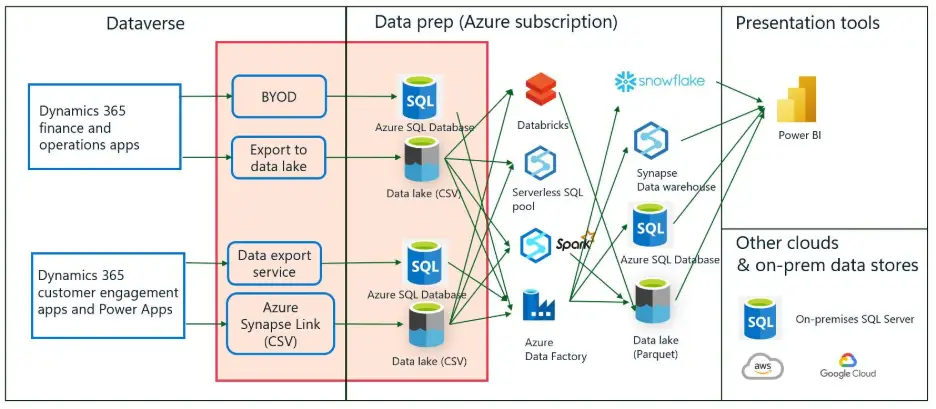
Jet Analytics – an ETL-based platform that extracts data from D365 F&O, transforms it into a clean, pre-modelled data warehouse and exposes it to Power BI through optimized semantic models.
Recommendation: Jet Analytics is the recommended approach for organizations that require production-grade, scalable, and maintainable BI reporting on D365 F&O. The direct Data Entities approach is suitable only for ad-hoc exploration or narrow, low-frequency reporting needs.
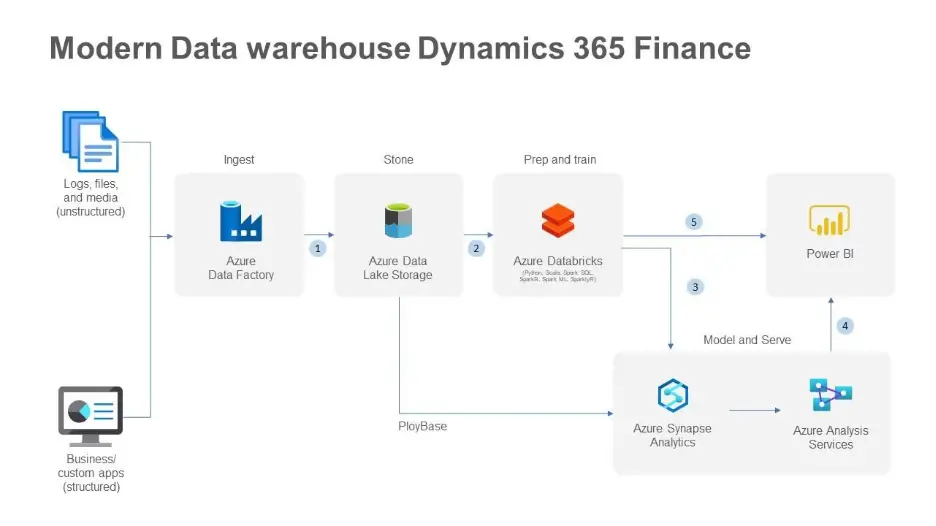
Jet Analytics vs D365 Data Entities: Detailed Comparison
The table below lays out a side-by-side comparison across the evaluation dimensions that matter most once reporting moves from a proof-of-concept into daily business use.
| Feature | Jet Analytics Classic | D365 Data Entities → Power BI |
|---|---|---|
| Data Architecture | Dedicated analytical data warehouse with star/snowflake schema. Optimised for BI workloads. | Flat OData or Azure Data Lake exports of normalised OLTP tables. Power BI must perform heavy transformation. |
| Performance | Queries run against a pre-built, indexed data warehouse. Sub-second response on large datasets. | OData calls are throttled by D365 API limits. Large datasets cause timeouts or require incremental workarounds. |
| Impact on D365 | Zero impact on live D365 environment. ETL runs on a separate database. | OData queries execute against the D365 application tier, risking performance degradation. |
| Data History | Full historical data retained in the warehouse from initial load onwards. Supports year-on-year comparison. | Limited to what is currently in D365. Deleted or archived records may be lost. Historical trending is limited. |
| Data Quality | ETL layer enforces cleansing, duplication, and business logic before data reaches Power BI. | Raw D365 data is exposed as-is. Data quality issues must be handled inside Power BI or Power Query. |
| AI Readiness | Limited | Designed for AI and Copilot workloads |
| Pre-built Content | Ships with 200+ pre-built KPIs, measures, and reports mapped to D365 F&O modules out of the box. | No pre-built semantic layer. All measures and report logic must be developed from scratch in Power BI. |
| Semantic Layer | Governed, reusable semantic model with business-friendly naming and shared definitions. | Each Power BI report builds its own model, leading to inconsistent definitions across reports. |
| Maintenance | Upgrade-resilient. Jet maps changes in D365 schema automatically or via managed updates. | D365 upgrades may break OData entity structures, requiring Power BI report rework after each update. |
| Scalability | Designed for enterprise scale. Supports multi-company, multi-currency, multi-ledger consolidation. | Scaling requires more complex Power BI Premium configurations and OData pagination handling. |
| Development Speed | Pre-built models accelerate time-to-value. New reports can be built in days, not weeks. | Each report requires full data modelling from scratch. Long development cycles for complex reports. |
| Licensing | Additional licensed product (Jet Analytics). Cost justified by reduced development and support overhead. | Scaling requires more complex Power BI Premium configurations and OData pagination handling. |
| Data Access Layer | Connects directly to D365 tables via Azure Synapse Link for Dataverse. Full table and field access with no API dependency. | Limited to fields exposed through pre-built or custom Data Entities. New data requires entity |
| New Data Requests | IT team adds missing tables or fields via drag-and-drop in Jet Analytics. No developer or release cycle needed. | Each new field requires a developer to build or extend a Data Entity — ongoing development cost for every new requirement. |
| Data Sources | Single warehouse supports D365 F&O plus any other source system (CRM, HR, third-party). One unified model in Power BI. | Scoped to D365 F&O only. Combining with other systems requires separate Power BI datasets and manual joins. |
| Ease of Use | Drag-and-drop interface accessible to the broader IT team. Low learning curve; no specialist ERP developer required. | Requires specialist D365 developer skills (X++, OData) plus advanced Power BI knowledge to build and maintain. |
Why Jet Analytics Outperforms the Direct Data Entities Approach?
– Purpose-Built for the Microsoft ERP Ecosystem
The Jet Analytics has been developed exclusively for the Microsoft Dynamics ecosystem, with native connectors for D365 F&O, D365 Business Central and legacy AX versions. That focus shows up in three practical ways:
- The data model reflects D365 F&O business logic, not raw database tables
- Module-level coverage spans Finance and Supply Chain
- Dimensions and fact tables are pre-mapped to standard ERP reporting needs
– Protecting the Live ERP Environment
One of the most critical concerns for any D365 F&O administrator is the risk of reporting queries degrading ERP performance during business hours. With Jet Analytics:
- All analytical queries run against a separate SQL Server or Azure SQL data warehouse
- The ETL process runs on a schedule during off-peak hours, minimizing system load
- The live D365 environment is never queried at report runtime
By contrast, connecting Power BI directly to OData Data Entities places query load on the D365 application tier itself which can visibly affect end-user experience during business hours, particularly around period close.
– Consistent, Governed Data Definitions
In organizations with more than one Power BI developer, a familiar problem emerges: the same metric gets defined differently across reports. “Revenue” in one dashboard might include intercompany transactions; the same word in another dashboard might exclude them and jet analytics closes that gap through:
- A centralized semantic layer with agreed, documented measure definitions
- Business-friendly naming conventions accessible to non-technical users
- Shared dimensions that keep filtering consistent across every report
– Built for Upgrade Resilience
Microsoft releases regular updates to D365 F&O, and those updates can modify the underlying data entity structures without warning. Under the direct Data Entities approach, each major upgrade carries real risk of breaking existing Power BI reports overnight. The Jet Analytics mitigates this by:
- Abstracting the Power BI model from the raw D365 schema
- Providing managed updates to the Jet data warehouse mappings, aligned to D365 release cycles
- Letting Jet absorb schema changes so Power BI reports don’t need to be rebuilt after every release
– Accelerated Time-to-Value
Jet Analytics ships with over 200 pre-built KPIs and measures covering the core D365 F&O modules, which means:
- Immediate access to financial, operational, and supply chain reports from day one
- A foundation development teams extend rather than build from a blank canvas
- Reduced dependency on specialist Power BI developers for standard reporting needs
– Multi-Company and Multi-Currency Consolidation
For organizations operating across multiple legal entities or currencies, Jet Analytics provides native support for:
- Cross-legal-entity financial consolidation with intercompany elimination
- Multi-currency reporting with currency translation handled at the warehouse level
- Group-level and entity-level reporting from a single Power BI model
Achieving equivalent functionality through Data Entities alone requires complex, custom DAX and Power Query logic which significantly increases both development time and ongoing maintenance cost.
Direct Table Access via Azure Synapse Link: Removing the API Bottleneck
A fundamental limitation of the Data Entities approach is that every single piece of information surfaced in Power BI must first be exposed through a D365 Data Entity. These entities are essentially API wrappers and if the field or table an analyst needs doesn’t already have a corresponding entity, it simply cannot be accessed without new development work.
That constraint creates a recurring cost and bottleneck. Every time a business user requests a new field or metric, a developer has to:
- Identify the underlying D365 table and field
- Build or extend a Data Entity to expose that field via the API
- Test and deploy the entity change, often requiring a full release cycle
- Update the Power BI dataset to consume the new entity output
Jet Analytics bypasses this entirely by connecting directly to the underlying D365 F&O tables through Azure Synapse Link for Dataverse. Instead of routing through the API layer, Jet reads raw tables replicated from D365 into Azure Data Lake giving it full visibility into every table and field in the system, including those that have never been exposed by any Data Entity.
Adding a previously unavailable field to a Power BI report does not require a developer or a code deployment. IT team members can locate the table and field directly within the Jet Analytics interface and include it in the data model using drag-and-drop eliminating recurring development costs as reporting requirements evolve.
How Jet Analytics Connects via Azure Synapse Link?
Understanding the underlying connection architecture makes it clear why Jet Analytics delivers more control, flexibility, and performance than the Data Entities / OData path.
The Data Entities / OData Architecture (Current Approach)
When Power BI connects to D365 F&O via Data Entities, the data flow passes through the application API tier:
- Power BI sends a query request to the D365 F&O application tier via OData
- The Data Entity — an API wrapper — translates that request into one or more underlying database queries
- Results return through the OData API, subject to row limits, throttling, and pagination constraints
- Power BI receives the data and must perform further transformation and modelling inside the report layer
This architecture places load on the live D365 application tier, is constrained to only what existing entities expose, and is subject to API throttling limits that cause timeouts on large datasets.
The Jet Analytics Architecture via Azure Synapse Link
Jet Analytics connects at the database replication layer, bypassing the API entirely. The data flow looks like:
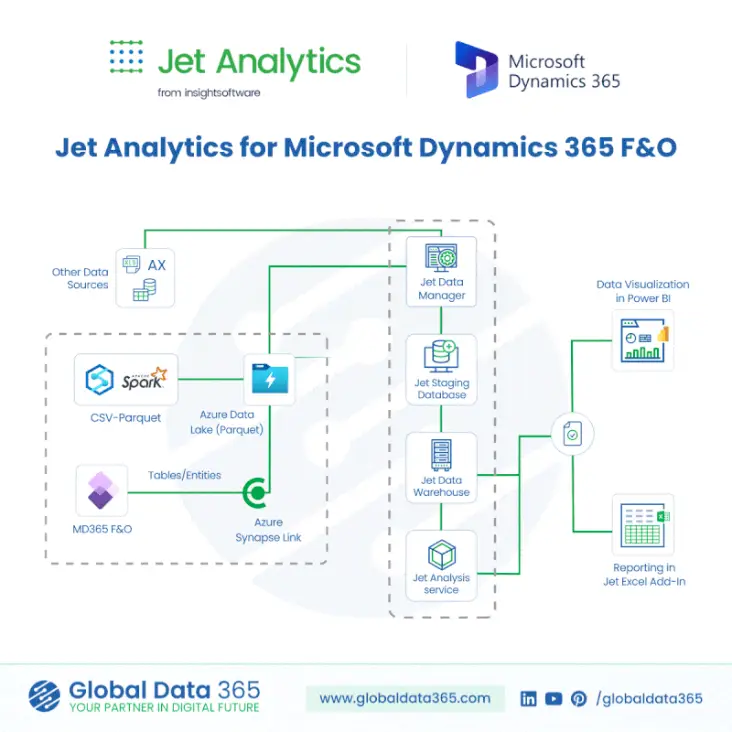
| Step | Flow | Description |
|---|---|---|
| Step 1 | D365 F&O → Azure Synapse Link for Dataverse | Microsoft’s native replication service continuously copies D365 F&O tables — not entities — directly into Azure Data Lake Storage Gen2. This runs outside the D365 application tier with no performance impact on the ERP. |
| Step 2 | Azure Data Lake → Jet Analytics ETL | Jet Analytics reads the replicated tables directly from the Data Lake. The ETL engine transforms, cleanses, and loads data into a structured analytical data warehouse. All tables and fields are available — no API gatekeeping, no entity dependency. |
| Step 3 | Jet Analytics Warehouse → Model Extension via Drag-and-Drop | IT team members browse the full table catalogue and add any table or field to the data model visually. No code, no developer, no deployment cycle. Other data sources can also be added alongside D365 data in the same warehouse. |
| Step 4 | Jet Analytics Warehouse → Power BI | Power BI connects to the Jet Analytics warehouse via a fast, direct SQL connection against a clean, indexed OLAP structure. No OData limits, no API throttling, no impact on D365 performance. |
What Full Table Access Means in Practice?
Because Jet Analytics operates against the full catalogue of replicated D365 tables rather than the limited subset exposed through Data Entities it delivers complete control over the analytics database:
- Access to every standard and custom D365 F&O table replicated via Synapse Link
- Visibility of fields that have never been included in any Data Entity
- Ability to create relationships between any two tables in the catalogue
- No dependency on the D365 development team to expose new data for reporting
- Freedom to add additional source systems alongside D365 in the same warehouse
In summary: the Data Entities approach gives you a window into D365 limited to what the API permits you to see. The Jet Analytics approach via Synapse Link gives you the full database, with complete control over which tables and fields are included in your analytics platform, without writing a single line of code.
When Direct Data Entities May Still Be Sufficient?
The direct Data Entities approach isn’t wrong in every scenario it simply has a narrow window where it makes sense:
- Ad-hoc, exploratory analysis by a single developer, not intended for production use
- Narrow, low-volume reporting on a single D365 entity with simple filtering requirements
- Organizations in the very early stages of D365 adoption, before reporting requirements mature
For any scenario involving multiple business users, recurring reports, finance or management reporting, or cross-module data, the limitations of the direct approach will quickly outweigh the cost savings of not licensing Jet Analytics.
Frequently Asked Questions?
For production-grade, recurring, or multi-user reporting, yes and jet offers sub-second query performance, full historical data retention, and a governed semantic layer none of which the direct Data Entities approach can reliably deliver at scale.
It can OData queries execute against the D365 application tier, which means heavy reporting load competes with day-to-day transactional processing and can degrade the end-user experience.
The Jet Analytics connects through Azure Synapse Link for Dataverse, reading replicated D365 F&O tables directly from Azure Data Lake bypassing the OData API layer and its row limits, throttling, and entity dependency entirely.
No, Jet Analytics abstracts the Power BI model from the raw D365 schema and provides managed updates aligned to D365 release cycles, so schema changes are absorbed without requiring report rework.
Yes. Jet Analytics supports ingestion from multiple source systems into a single warehouse, enabling one unified Power BI model across D365 F&O, CRM, HR, and third-party platforms something Data Entities cannot do on their own.
Recommendation: Adopt Jet Analytics as the Standard Analytics Platform for D365 F&O
Adopt Jet Analytics as the standard analytics platform for D365 F&O reporting. The investment in Jet Analytics licensing is offset by the significant reduction in Power BI development effort, report maintenance overhead, and the risk of ERP performance incidents caused by uncontrolled direct queries.
The direct Data Entities path will always look cheaper on day one, because it uses licensing the organization already owns. But that math changes quickly once a second business unit needs the same data, once the first D365 upgrade breaks a dashboard mid-quarter, or once someone in finance asks for a number from eighteen months ago that the live system no longer holds. Jet Analytics is built to remove those failure points before they become production incidents turning Power BI on D365 F&O from a fragile, developer-dependent process into a governed, scalable reporting platform the whole business can rely on.
Ready to move from Data Entities to a governed Jet Analytics warehouse?
Search Blog
Related Resources
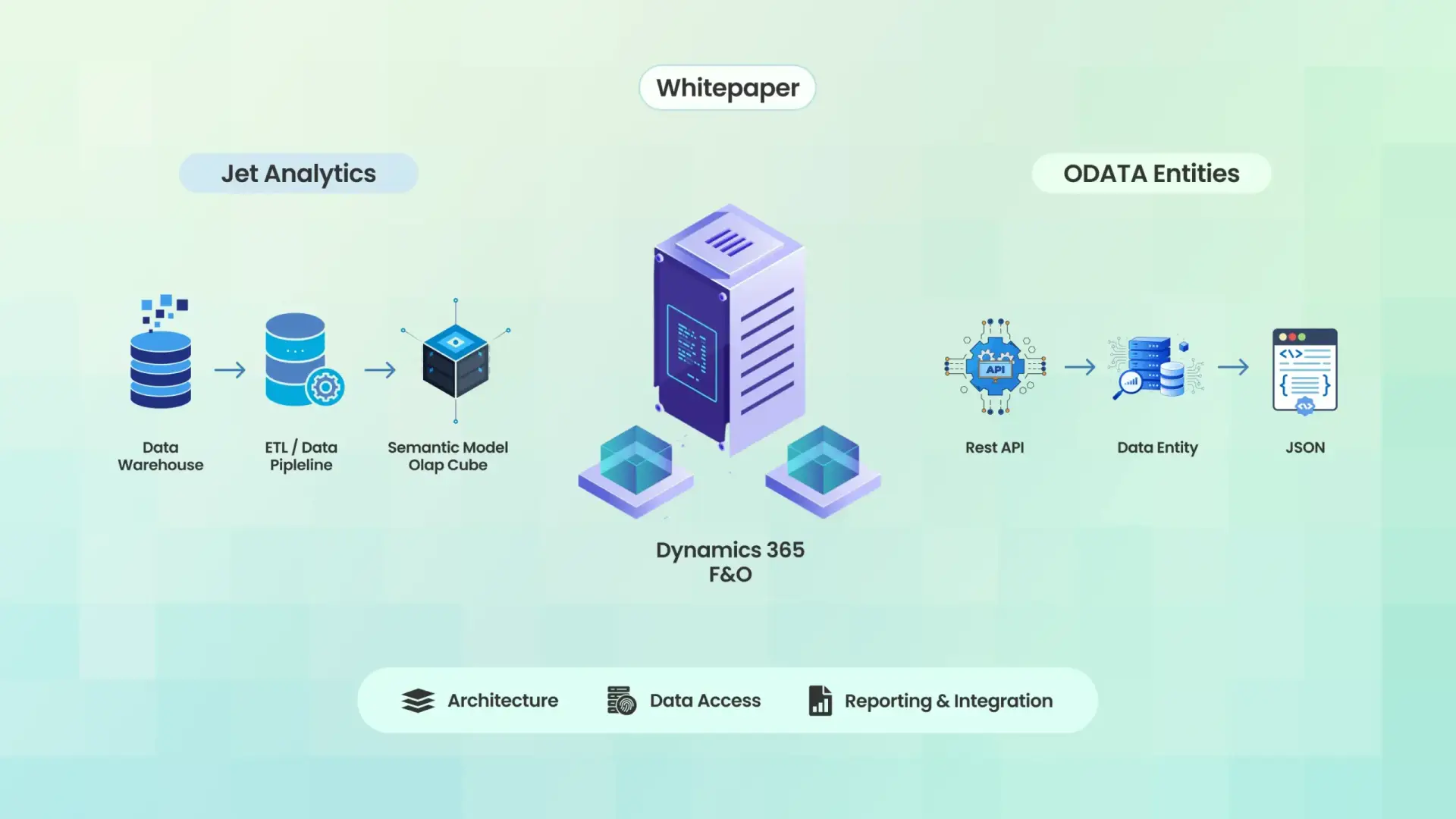
Jet Analytics vs Dynamics 365 Data Entities
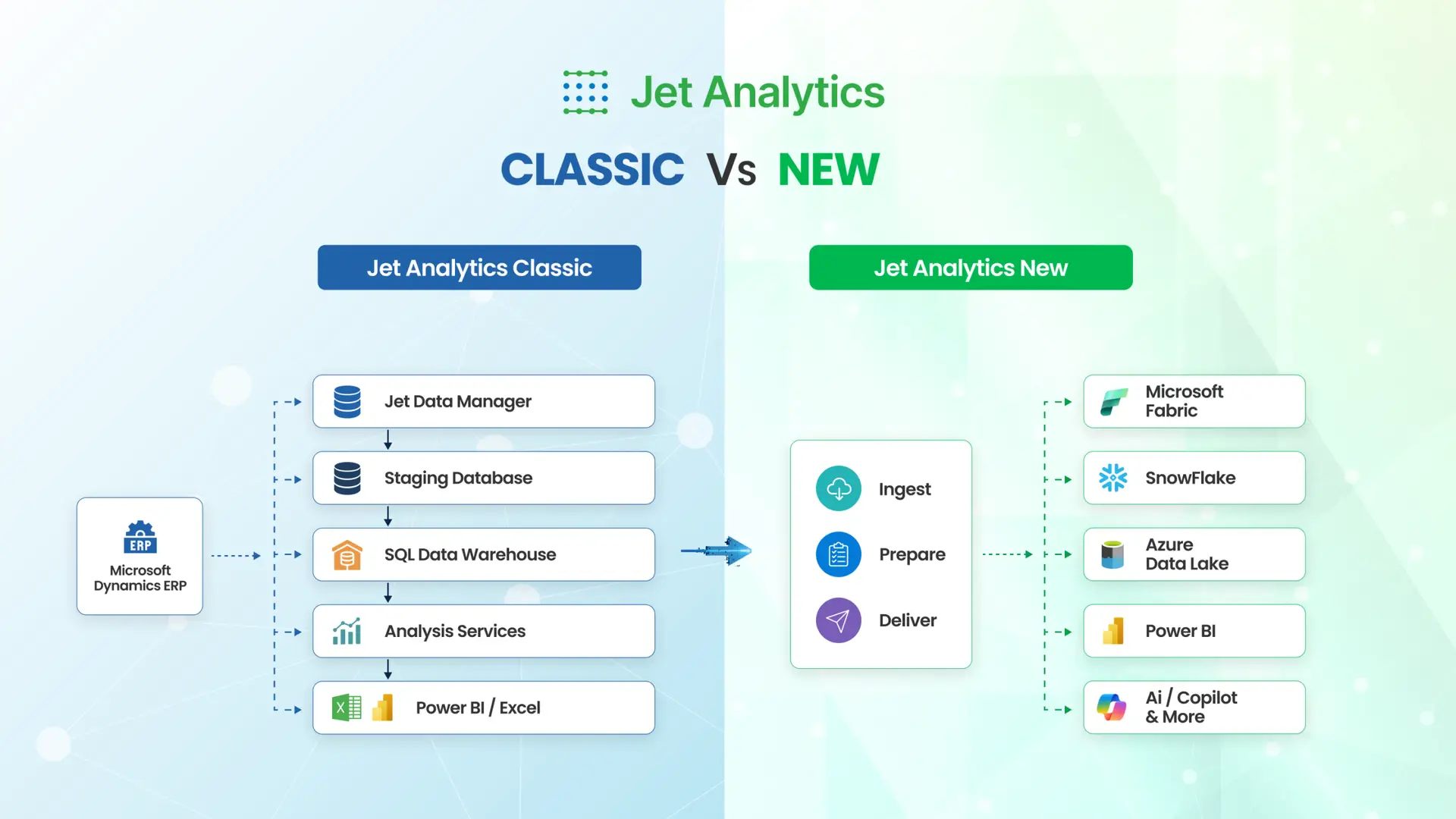
Jet Analytics Classic vs New Jet Analytics

Jet Analytics Training

Ayesha Binte Habib
Still using Classic Jet Analytics?
Get Free Demo to Upgrade to New
Jet Analytics for AI Ready Data Foundation