Enterprise Resource Planning

key features of microsoft dynamics 365 crm

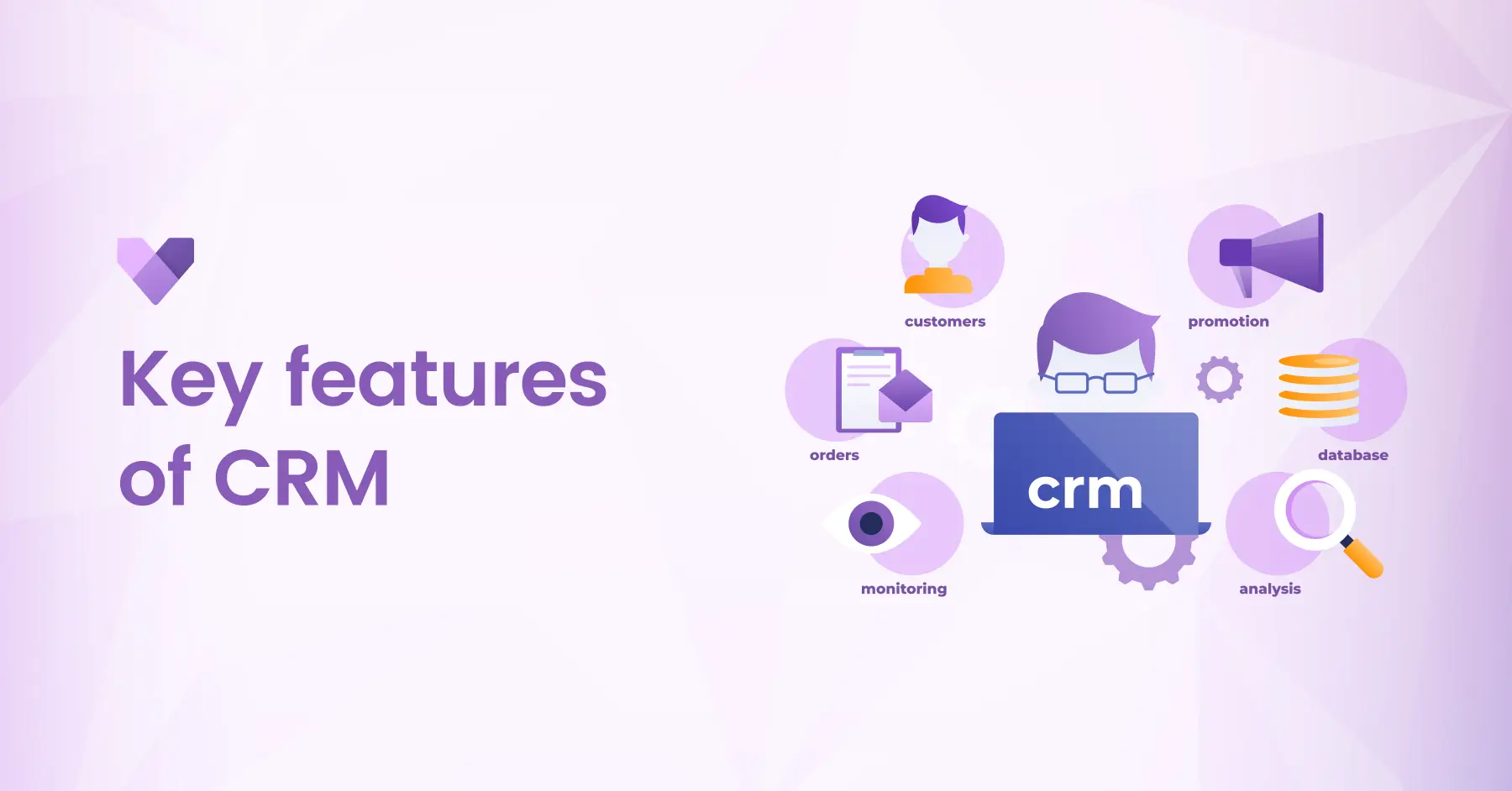
Key Features of CRM (Customer Relationship Management)
Key Features of Microsoft Dynamics 365 CRM: Transforming Customer Relationships

key features of microsoft dynamics 365 crm

In today’s competitive business world, building and maintaining strong customer relationships is the foundation of success. Organizations need a powerful and flexible Customer Relationship Management (CRM) system that not only helps manage customer interactions but also drives productivity and growth. Microsoft Dynamics 365 CRM, a part of the Microsoft Dynamics 365 suite, is designed to do just that offering intelligent tools to streamline sales, service, marketing, and beyond. Let’s explore in detail the key features of Dynamics 365 CRM that can help your organization strengthen relationships, improve efficiency, and achieve business excellence.

Introduction to Microsoft Dynamics 365 CRM

Microsoft Dynamics 365 CRM is a cloud-based solution that unifies customer data, automates key processes, and empowers teams to deliver exceptional customer experiences. From tracking leads to resolving customer issues and optimizing marketing efforts, Dynamics 365 CRM provides everything businesses need to nurture relationships and drive growth, all from a single, integrated platform.


By combining insights, automation and AI-driven intelligence, it helps organizations move beyond transactional interactions to build long-lasting customer trust and loyalty.

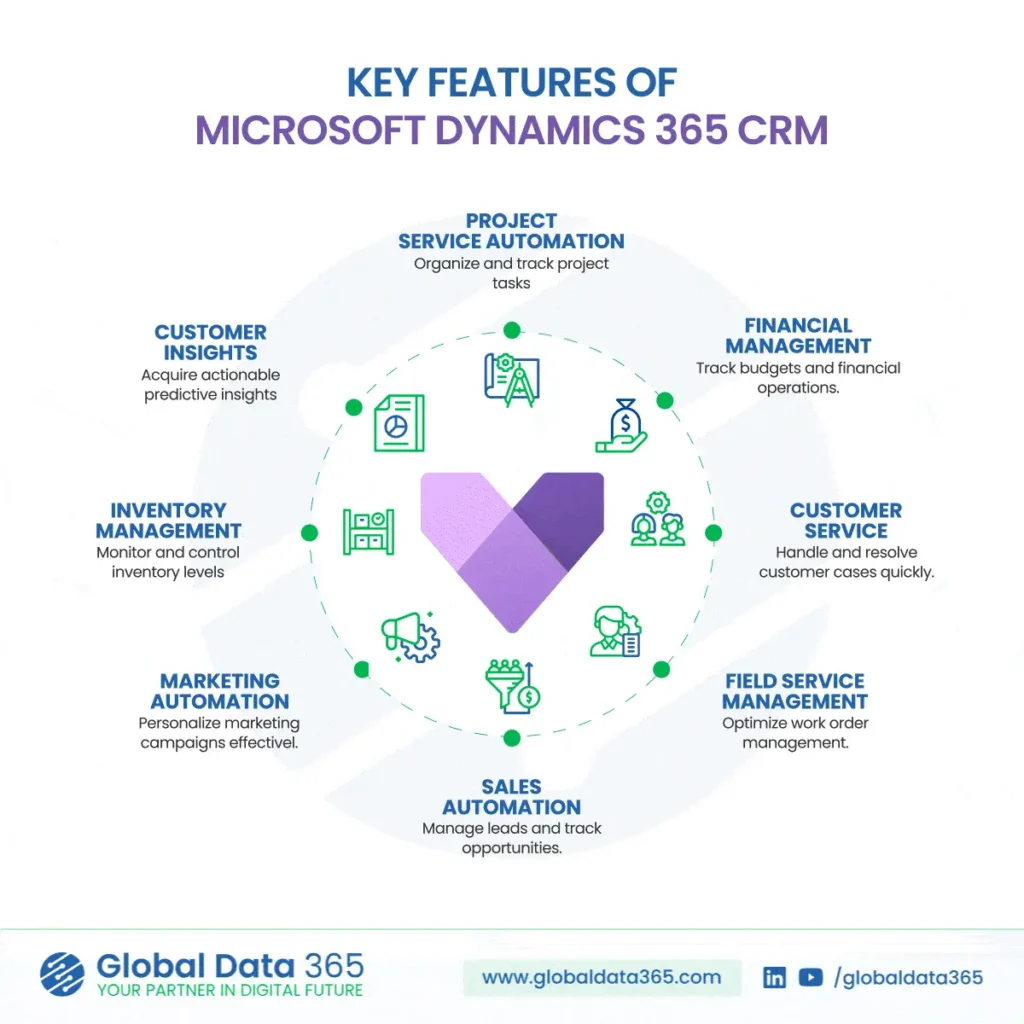
Key Features of Microsoft Dynamics 365 CRM
key features of crm

1. Project Service Automation

Efficient project management lies at the heart of business success. Dynamics 365 CRM simplifies how organizations organize, track and deliver projects on time and within budget.

  • Create and manage project tasks and milestones.

  • Track resource allocation, costs, and progress in real time.

  • Improve collaboration between teams and ensure project transparency.

With integrated automation and analytics, businesses can achieve higher accuracy, better forecasting, and greater customer satisfaction.

2. Financial Management

Dynamics 365 CRM allows organizations to maintain tight control over financial operations and ensure data-driven decision-making.

  • Track project budgets and monitor financial performance.

  • Automate billing, invoicing, and payment tracking.

  • Gain real-time visibility into revenue streams and expenses.

By integrating with other Dynamics 365 applications, such as Business Central, businesses can achieve a unified financial and operational ecosystem that enhances profitability and control.

3. Customer Service Management

Customer satisfaction is crucial for retention and growth. Dynamics 365 CRM empowers service teams to handle and resolve cases quickly and efficiently with tools designed for superior customer support.

  • Manage and assign customer cases automatically.

  • Access complete customer histories for personalized service.

  • Utilize AI-driven insights to predict issues and recommend solutions.

The result: faster resolutions, improved satisfaction, and stronger customer loyalty.

4. Field Service Management

For organizations that rely on field operations, Dynamics 365 CRM offers tools to optimize work order management and deliver seamless field service experiences.

  • Schedule and dispatch field technicians efficiently.

  • Track job progress and resource utilization in real time.

  • Enable mobile access for on-site teams to update information instantly.

This ensures consistent service quality, reduced downtime, and enhanced productivity across all service locations.

5. Sales Automation

Sales teams thrive on clarity, collaboration and actionable insights. Dynamics 365 CRM automates sales workflows to help you manage leads and track opportunities from prospect to close.

  • Capture, nurture, and score leads automatically.

  • Track pipeline performance and forecast revenue accurately.

  • Collaborate seamlessly with real-time customer data.

By providing a complete view of every customer interaction, sales teams can focus on what matters most — building relationships and driving conversions.

6. Marketing Automation

Personalized engagement is key to successful marketing. With Dynamics 365 CRM, marketers can plan, execute and measure campaigns with precision.

  • Segment audiences and deliver targeted campaigns.

  • Automate email journeys and nurture leads efficiently.

  • Analyze campaign performance with real-time dashboards.

Marketing Automation ensures that every campaign feels personal, relevant, and impactful — driving stronger brand connections and better ROI.

7. Inventory Management

Even within CRM, operational visibility matters. Dynamics 365 CRM allows businesses to monitor and control inventory levels to meet customer demand efficiently.

  • Track stock levels and item availability in real time.

  • Automate reorder processes to avoid shortages or overstocking.

  • Integrate with supply chain systems for end-to-end visibility.

This level of transparency helps maintain smooth order fulfillment and enhances customer trust.

8. Customer Insights

Every interaction tells a story and Dynamics 365 CRM helps you listen. With Customer Insights, businesses can leverage AI and analytics to uncover patterns, predict behavior and personalize engagement.

  • Analyze customer journeys and buying trends.

  • Build unified customer profiles from multiple data sources.

  • Deliver predictive recommendations to sales and service teams.

By turning raw data into actionable insights, organizations can anticipate customer needs and exceed expectations.

In Conclusion

Microsoft Dynamics 365 CRM offers more than just customer management it’s a complete solution that empowers organizations to build meaningful relationships, improve operational efficiency, and make smarter business decisions. From sales and service automation to marketing intelligence and project management, its powerful features of CRM transform how you connect with customers.


By leveraging its integrated capabilities, your teams can work more collaboratively, respond faster, and deliver personalized experiences that drive loyalty and growth. Microsoft Dynamics 365 CRM enables you to streamline your processes, enhance customer satisfaction, and accelerate business success making it the ultimate tool to strengthen your organization’s relationship with customers and achieve long-term growth.

Transform your customer relationships with Dynamics 365 CRM

Share this blog on:

Search Blog

About Us

Global Data 365 is composed of highly skilled professionals who specialize in streamlining the data and automate the reporting process through the utilization of various business intelligence tools.

Follow us on:

Still using Jet Basics?

Get Free Upgrade
to Jet Reports

jet services

Subscribe to Our Newsletter

Key Features of Microsoft Dynamics 365 CRM: Transforming Customer Relationships Read More »
key features of dynamics 365 business central

Key Features of Business Central

Key Features of Business Central That Drive Smarter Business Operations

key features of dynamics 365 business central

In today’s fast-paced business environment, organizations need a flexible and comprehensive ERP solution to manage their operations efficiently. Dynamics 365 Business Central, a part of the Microsoft Dynamics 365 suite, is a powerful tool designed to help businesses rationalize their processes, improve productivity, and make informed decisions. Let’s explore in detail the key features of Dynamics 365 Business Central that can help unlock your business’s potential and drive success.  

Introduction to Dynamics 365 Business Central

Dynamics 365 Business Central is a cloud-based ERP solution that offers a wide range of functionalities to help businesses manage their finances, operations, sales, and customer service. It provides a unified platform for businesses to improve their processes, automate routine tasks, and gain insights into their operations. 

Key Features of Dynamics 365 Business Central

key features of business central

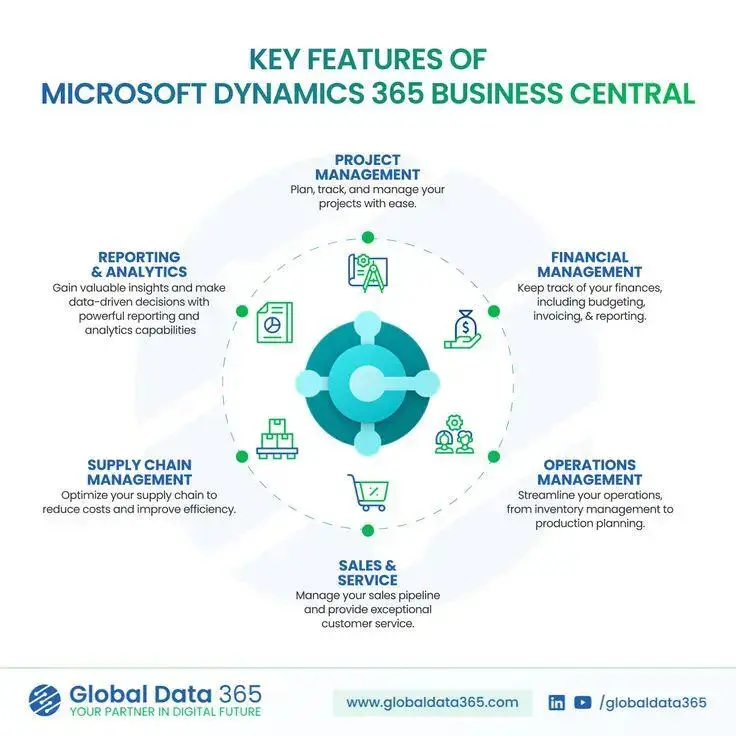
Financial Management

With Business Central’s financial management features are designed to streamline financial processes, provide real-time visibility into financial performance, and enhance financial control. 


  • General Ledger: Manage your company’s financial records and track transactions. 
  • Accounts Payable: Track and manage payments to suppliers and vendors. 
  • Accounts Receivable: Manage customer invoices and track payments. 
  • Budgeting: Create, manage, and track budgets to control spending and distribute resources effectively. 
  • Cash Flow Forecasting: Predict future cash flow based on historical data and current financial information. 

Operations Management

It offers tools to streamline and automate day-to-day operations, enhancing productivity and ensuring efficient resource utilization.


  • Inventory Management: Monitor stock levels, manage inventory movements, and avoid shortages or overstocking.

  • Warehouse Management: Optimize warehouse layout, streamline picking and shipping, and improve order accuracy.

  • Production Planning: Plan and manage production schedules, resources, and materials to meet demand efficiently.

Supply Chain Management

In D365 Business Central helps businesses streamline their supply chain operations, enhance inventory levels, and improve overall efficiency.  


  • Procurement: Simplify the procurement process, from requisition to payment. 
  • Inventory Management: Track inventory levels, manage stock movements, and optimize inventory levels. 
  • Order Processing: Manage sales orders, track order status, and improve order fulfillment processes. 

Sales and Marketing

Business Central includes features for managing sales and marketing activities, improving customer engagement, and driving revenue growth.  


  • Lead Management: Track and manage leads to convert them into opportunities. 
  • Opportunity Tracking: Manage sales opportunities and track sales pipeline. 
  • Campaign Management: Plan, execute, and track marketing campaigns to reach target customers. 

Project Management

For project management Business Central offers capabilities, including project planning, resource management and time tracking.  


  • Project Planning: Create project plans, assign tasks, and track project progress. 
  • Resource Management: Allocate resources to projects based on availability and skillset. 
  • Time Tracking: Track time spent on projects to ensure accurate billing and project costing. 

Human Resources Management

Business Central helps businesses streamline HR processes, ensure compliance with regulations and improve employee engagement. Key features include: 


  • Employee Records: Maintain employee information, including personal details, employment history, and performance reviews. 
  • Payroll: Manage payroll processing, including calculation of wages, deductions, and taxes. 
  • Benefits Administration: Manage employee benefits, including health insurance, retirement plans, and other benefits. 

Reporting and Analytics

It provides robust reporting and analytics capabilities, including pre-built reports and customizable dashboards.  


  • Reporting: Generate financial reports, sales reports, and operational reports to gain insights into business performance. 
  • Analytics: Analyze data to identify trends, patterns, and opportunities for improvement. 
  • Dashboards: Create customizable dashboards to monitor key performance indicators (KPIs) and track progress towards business goals.

In Conclusion

Microsoft Dynamics 365 Business Central offers a comprehensive suite of features that can truly unlock your business’s potential. From streamlining financial processes to optimizing supply chain management and enhancing sales and marketing efforts, Business Central Dynamics provides the tools you need to drive growth and success. By leveraging its integrated capabilities, you can improve efficiency, gain better visibility into your operations, and make informed decisions that propel your business forward. 


Ready to unlock your business’s potential with Microsoft Dynamics 365 Business Central? Contact Global Data 365 today to learn more about how Business Central can help streamline your operations, improve efficiency, and drive growth. 

Get Your Custom Migration to Business Central Plan

Share this blog on:

Search Blog

About Us

Global Data 365 is composed of highly skilled professionals who specialize in streamlining the data and automate the reporting process through the utilization of various business intelligence tools.

Follow us on:

Still using Jet Basics?

Get Free Upgrade
to Jet Reports

jet services

Subscribe to Our Newsletter

Key Features of Business Central That Drive Smarter Business Operations Read More »

Migration to Microsoft Business Central

Migration to Business Central: 7 Essential Tips

Migration to Business Central: 7 Key Tips

Migration to Microsoft Business Central

As industry demands evolve, so do business requirements, which is why leading ERP vendors have shifted their focus to cloud-based solutions in recent years. Migration to Microsoft Business Central is at the forefront of this transition, offering businesses a streamlined pathway to modernization. However, balancing legacy systems with cutting-edge technology presents unique challenges. Software analysts have worked diligently to minimize disruption, ensuring that ERP users can adopt new features and increased convergence with minimal friction.


That method, however, eventually reaches its inherent limitations. Legacy framework modernization requires a major investment on the part of ERP vendors. Dealers should sever all ties from the past to achieve some of the main technological goals that lead to lower prices, improved agility, and consumer value. Finally, ERP consumers should (at least in principle) reach a point where their software systems are allowing higher performance, better organizational control, and creativity for the company. However, there is a lot that business leaders can do along the way to cut costs, minimize risk, and maximize the value that ERP device improvements provide in the end.


Microsoft has been running a range of ERP solutions for small and mid-sized businesses for nearly two decades. Whenever the company bought Great Plains, it was a big deal. Software acquired two commonly used ERP products, Great Plains and Solomon, in 2001. The ensuing range of four separate ERP packages was renamed the Dynamics family of products by Microsoft (GE, SL, NAV, and AX, respectively). Since then, the company has maintained all four products, allowing consumers to continue using their current ERP applications. This has been fantastic in terms of minimizing disruption for Microsoft’s customers. In the near future, Microsoft will concentrate its resources on two goods that appeal to two distinct consumer segments. Dynamics 365 Finance & Supply Chain (F&O; SCM) is designed for mid-sized businesses, while Dynamics 365 Business Central (D365 BC) is designed for smaller businesses with simpler needs. If your company is still using Dynamics GP, Dynamics SL, or Dynamics NAV, Microsoft is probably already urging you to upgrade to D365 BC.


Listed below are the main factors that you should keep in mind before migrating to Dynamics 365 Microsoft Business Central.

1. Understand the Business Central Framework

Since Microsoft D365 Business Central is based on the Microsoft NAV code base, many people confuse it with a newer version of that product. That is a fair statement in several ways since Microsoft carried over the main concepts from NAV to Office 365. With NAV as a starting point, D365 BC and developed the usable code and data model. However, for most companies that are still using Dynamics NAV, the switch to Business Central would be a more significant change. Transitioning from Dynamics GP or Dynamics SL to Microsoft D365 BC would necessitate a complete break from the past.

Moving to Business Central is the same as introducing a brand-new ERP system. It will necessitate a detailed review of current business processes, followed by the conversion of those processes to Microsoft D365 BC.

2. Assess Customizations and ISV Products

You will have to update current customizations and check incorporated third-party products to make sure they’ll work with Microsoft D365 BC, regardless of the ERP system you’re migrating from. Since D365 Business Central is a new product, you might be able to meet your company’s needs using the off-the-shelf features already included in the product. You must study the current business processes and map them to the new ERP framework, irrespective of the legacy system you’re moving from. If you’re already using Dynamics GP or SL and have made some customizations, you’ll have to start over in Microsoft D365 BC. In certain instances, D365 might already have the necessary features. Otherwise, you’ll have to fill in the blanks with plugins or third-party apps.

3. Allocate Sufficient Time and Budget for Reports

Report development can consume up to 25% of a company’s overall budget when introducing a new ERP system. Even when you’re switching to the latest version of a current design, handling reports will eat into your budget and resources since most ERP systems’ standard reporting tools necessitate highly specialized technical knowledge. You’ll need to evaluate and validate existing reports because Microsoft D365 BC is new software. Customers moving from Dynamics GP or Dynamics SL would have to rebuild all existing reports created with standard Microsoft software in Business Central from the ground up.

4. Planning Ahead for Data Migration to Business Central

Customers may use data transfer software to shift data from any of the legacy Dynamics products to D365 BC. Many consumers, on the other hand, would take a more complex approach to bring data into Business Central. An off-the-shelf automated process to migration might not always perform well if you have made customizations or changes to your legacy ERP framework that expand the current information. A data warehouse can also be used to automate raw data and transformation in advance of device migration. As a result of this, businesses can easily test data migration strategies and also to train users on the new system using real company data rather than demo data.

5. Minimize Disruptions During Transition

Microsoft has supported multiple ERP products for years to reduce disruption. However, with a focus on D365 Business Central and D365 Finance & Supply Chain Management, legacy users must prepare for migration. Proper change management, employee training, and phased implementation can ease the transition.

6. Leverage Jet Reports and Analytics

Luckily, most of the tasks associated with this aspect of the ERP implementation process can be reduced or even eliminated. If you’re currently running Jet Reports against a NAV database, you’ll be able to move your reports to Microsoft D365 BC. Jet Analytics, meanwhile, integrates with the whole Dynamics product family, including GP, SL, NAV, and D365 BC, making it incredibly simple to build a data warehouse, collect and turn data from the source system, and build complex reporting and analytics.

One of the main advantages of Jet Analytics is that it makes it incredibly easy for end-users to generate and change reports without the assistance of IT specialists or costly outside consultants. Companies will simplify the process of generating or changing reports by placing the control in the hands of finance and accounting experts, not only during a system installation or migration but when they need report customization in the future. In the scenario of a device migration from Dynamics NAV to D365 BC, there’s a good chance that any reports generated in Jet Analytics will operate with Business Central without any changes.

7. Work with Experienced ERP Consultants

Partnering with experienced ERP consultants can streamline migration by offering expertise in Business Central implementations. They can assist with data migration, customizations, and training, ensuring a seamless transition.

In Conclusion

Global Data 365 offers financial analytics solutions for the entire Microsoft Dynamics software products. We’ve been assisting business leaders in getting the knowledge they need effectively, reliably, and efficiently for nearly three decades.

If your company is considering migration to Microsoft Dynamics 365 Business Central in the future, we suggest learning more about the advantages of our quick but efficient reporting tools. Contact us now for a free demo.

Get Your Custom Migration to Business Central Plan

Share this blog on:

Search Blog

About Us

Global Data 365 is composed of highly skilled professionals who specialize in streamlining the data and automate the reporting process through the utilization of various business intelligence tools.

Follow us on:

Still using Jet Basics?

Get Free Upgrade
to Jet Reports

jet services

Subscribe to Our Newsletter

Migration to Business Central: 7 Essential Tips Read More »

Migrating from On-Premise ERP to Microsoft Dynamics 365 F&SCM

Migrating from On-Premise ERP to Microsoft Dynamics 365

Migrating from On-Premise ERP to Microsoft Dynamics 365

Migrating from On-Premise ERP to Microsoft Dynamics 365 F&SCM

Many software companies are embracing a cloud-first approach when designing, deploying, and delivering their products and ERP is no exception. Microsoft has been enhancing its ERP and CRM business applications for years, making migrating ERP to Dynamics 365 a natural step for organizations moving toward a cloud-centered strategy. Customers of Microsoft Dynamics AX, Microsoft Dynamics NAV, Microsoft Dynamics GP, and Microsoft Dynamics SL will eventually move to one of the two cloud-based ERP products, Microsoft Dynamics 365 Business Central (D365 BC) or Microsoft Dynamics 365 Finance & Operations (D365 F&O).


Importance of Reporting Tools in Business Management

Microsoft will target its resources in the future on only those two ERP products. Microsoft D365 F&O is aimed at mid-sized companies, while Microsoft D365 BC is more suited to smaller businesses with simpler needs. Both technologies have their origins in one of Microsoft’s current ERP code lines (AX and NAV, respectively), but the company has redesigned its technology and made major improvements. Microsoft is likely urging you to consider moving to the cloud if your company is currently using any of the Microsoft Dynamics legacy products. Microsoft continues to support its legacy products until at least 2028, but potential investments in enhanced features will be focused on the two latest Microsoft D365 products.


Making the transition to cloud ERP comes with a slew of advantages. It offers a reliable, scalable IT infrastructure and enhanced integration capabilities, allowing wider implementation of digital transformation technologies. Moving to the cloud, on the other hand, would necessitate yet another large project, with all of the associated expense, difficulty, and risk. How do companies navigate the process to achieve beneficial outcomes while staying within budget and risk constraints?


Some of the best practices for migration to Microsoft Dynamics 365 include:

- Starting the Process Early

Despite Microsoft’s determination to support its legacy Dynamics products for at least another eight years, business leaders should begin considering cloud migration now. The big picture of the migration process allows companies to better prepare for the future and divide the process down into smaller steps that are easier to handle and lower risk. Companies can better identify their needs if they provide enough time for thorough preparation and review. This includes determining which Microsoft D365 components the new platform would need. Microsoft is using a more flexible licensing model for its cloud-ERP apps than it does for its legacy on premise ERP applications.


Microsoft D365 Finance and Operations, for example, is made up of two main parts: Microsoft D365 Finance and Microsoft D365 Supply Chain Management. You may buy user licenses for specific subgroups of the entire experience, but they function together as a cohesive whole. As a result, rather than paying a premium price for unrestricted access, you’ll only pay for the features needed for each user. Current Microsoft Dynamics customers are eligible for discounts, which should be noted by business leaders. Microsoft has encouraged consumers to make the transition by providing competitive subscription rates to customers of their current legacy ERP solutions, while the company seeks to rapidly expand its position as a pioneer in cloud ERP.

- Deploying a Test Setting

Customers usually also create vendor specifications to simplify the management of incoming inventory. Electronic Data Interchange (EDI) is the default for obtaining the sales order and delivering advanced shipping notices (ASNs) to customers used by big-box retailers. Larger consumers also enforce barcoding conditions. Although those are well-known examples, large companies are increasingly requiring suppliers to adhere to other requirements as well. Walmart declared its plan to reduce CO2 emissions in 2017. Project Gigaton, as the program is called, aims to reduce the company’s carbon footprint across the supply chain. In other words, Walmart will demand that its suppliers keep track of the carbon footprint of the goods they sell to the company.


Only a few ERP vendors have built processes into their software to monitor this type of data. It is starting to happen in the biggest, most costly programs, but for most organisations, the problem can be solved with a blend of custom user-defined fields and versatile reporting tools. Whatever potential requirements can entail, reporting tools may help companies remain in compliance.

- Divide the Project

Trying to break up a cloud-ERP migration into smaller chunks is a smart idea for business leaders. This may include initiatives that can be done in advance, providing immediate benefits to the company and a reduction in cost and risk when it is time to migrate the ERP to the cloud. An improvement of reporting tools, procedures, and designs is another big project that you can do ahead of time. This is simpler than it seems, and it’s particularly critical in the sense of migrating to Microsoft D365 in the cloud because Microsoft is making significant technological improvements to the way you manage data for reports and also the reporting set of tools for its ERP applications.


Microsoft has limited direct access to the Microsoft D365 F&SCM server to boost security, substituting it with an abstraction layer made up of “data entities.” The new strategy to migration to Microsoft D365 F&SCM necessitates a significant investment in the creation of data entities that will push reporting against the cloud-ERP framework. The effort would necessitate highly trained technical experts and will take a long time. Microsoft’s latest reporting strategy is motivated by the company’s willingness to transfer customers to Azure Data Lakes and Microsoft Power BI.

What can Global Data 365 Offer for Migrating ERP to Microsoft Dynamics 365?

The reporting and analytics tools from Global Data 365 minimize complexity, lower costs, and reduce the possibility of lengthy implementations. They remove the need for experts by allowing finance, accounting, operations, and other departments to generate and adjust reports without relying on IT. We have advanced reporting and analytics solutions that integrate with more than 140 different ERP software systems, including the entire Microsoft Dynamics product line. One of them is Jet Analytics. It greatly simplifies and reduces the expense of cloud migration. Reports produced for legacy systems Microsoft Dynamics products can operate in the Microsoft Office D365 setting without a lot of changes.


Schedule a personalized demo with one of our Jet experts to see how we can simplify migrating ERP to Dynamics 365 with powerful reporting and analytics. Contact us now.

Get a Free Demo on how to optimize your reporting with JET
Product of Interest

Share this blog on:

Search Blog

About Us

Global Data 365 is composed of highly skilled professionals who specialize in streamlining the data and automate the reporting process through the utilization of various business intelligence tools.

Follow us on:

Want to try Jet Analytics?

Get Free License for 30 Days
Jet Analytics Hero Section

Subscribe to Our Newsletter

Migrating from On-Premise ERP to Microsoft Dynamics 365 Read More »

ways to optimize your ERP reporting

How to Optimize Your ERP Reporting?

Optimize Your ERP Reporting

ways to optimize your ERP reporting

According to a recent study, nearly 81% of companies surveyed reported that they had either introduced the use of ERP software or were in the process of implementing it. So, what makes ERP reporting important? By leveraging ERP data analysis, businesses can create strategic plans, forecast future trends, and develop advanced strategies. To truly maximize these benefits, it’s essential to optimize your ERP reporting for more accurate insights and decision-making.


A depth of data indicates that financial reporting generates as much clarification as it creates confusion:


97% of CFO’s have uncertainty regarding the quality of reporting.


  • 40% of CFO’s are concerned that information is reliable and precise.
  • 87% of accountants function overtime to complete the financial closing.
  • 86% of finance teams say that their analytics are not informative.

The only downside is that companies cannot be successful if they don’t have reliable, accurate, and detailed ERP reporting, which can lead to them making risky choices without even acknowledging it. The plus side is that optimizing ERP reporting is not a difficult task in comparison to the usual reporting process.


Listed below are the 5 ways businesses can optimize their ERP Reporting to make it quick and easy:

- Self-Service Reporting

Users often need to submit a request to IT before getting access to a report and wait in a queue until they can access it. Users must depend on technical experts because working with the underlying data is hard. For users who are not IT experts, self-service ERP reporting is intended to be user-friendly. This kind of reporting is less about the careful organization of data and more about being cost-effective and a time saver.


For instance, IKEA, one of the biggest retail company has enabled self-service ERP reporting after the implementation of Jet Reports and witnessed instant results. A report that may have taken hours for a warehouse manager can now be done within seconds. Time is saved by enabling self-sufficient ERP reporting.

- Automated Processes

A large-scale data organization effort is required to report on finance and operations throughout different departments. The workload includes tracking information from different sources, transferring it from one document to another, and putting time and effort to arrange it all in one clear performance portrait. Advanced automated processes speed up this effort by automatically placing data from ERP systems and other networks, then placing it for immediate analysis into pre-built ERP report templates.


Amref Health Africa, a major NGO in Africa, was having difficulty handling data manually before adding Jet Reports to its reporting toolbox. Now the organization spends less time on handling information and reporting.

- Flexibility

Reporting is a regular duty that changes with time. Depending on the same reports adds up to poor performance management, but it takes extra time and feedback from IT experts to produce customized reports. ERP reporting stops being a hassle when it is simple to track various metrics, rewrite reporting data, receive deep insight from reports into transferable data, and access real-time updates on request.


Using an ERP reporting tool, companies can keep track of their data in real-time. Fawaz Holding seized the benefit of customized reports when it introduced Jet Reports to operate side by side with its Microsoft Dynamics 365 Business Central ERP. By building flexibility into the processes, ERP reporting becomes easier.

- Business Continuation

Accurate ERP reporting is vital after the global pandemic. Decision-makers instantly require quality, updated data, but it can also be made inaccessible by the same situation that makes it essential. ERP reporting should function at any time, providing the same robust functionality even though users are operating from elsewhere.


Similarly, Enova Facilities Management started to save time on ERP reporting using Jet Reports. When COVID-19 struck, the business utilized those time saved. The challenge didn’t sway the method of reporting, instead, it provided leaders greater insight into the situation.

- Higher Standards

ERP reporting can be difficult when the processes are not automated. It leads to a lot of time and effort spent on manually documenting reports and generating analysis. Many ERP reporting systems allow the users data security. It is important to set high standards for data reporting, so businesses need to implement robust ERP systems to automate processes and receive greater insight into the workings of all departments.


Air Trade Centre, a Turkish electronics firm felt it needed quicker ERP reporting and relied on Jet Analytics as the solution. After that, reporting then demanded 60% less feedback overall, which reduced the time it took IT on reporting.

In Conclusion

Learn How to Optimize Your ERP Reporting as accurate reporting is a result of quality data, which is precisely the reason the process takes time. Data is an unruly commodity that takes an extra effort to control, protect, and manipulate. As the data volume grows, ERP reporting will fall behind and cause companies to delay acting. That is why it is important to search for strategies that make data as quickly available as possible by automation.


So, if you face any challenges in reporting, our experienced consultants can provide you with solutions to help you optimize your ERP reporting and make your business grow. Schedule a call to discuss your requirements. Contact us now.

Get a Free JET Demo Now!

Share this blog on:

Search Blog

About Us

Global Data 365 is composed of highly skilled professionals who specialize in streamlining the data and automate the reporting process through the utilization of various business intelligence tools.

Follow us on:

Want to try Jet Analytics?

Get Free License for 30 Days
Jet Analytics Hero Section

Subscribe to Our Newsletter

How to Optimize Your ERP Reporting? Read More »