Dynamics ERP systems

microsoft dynamics 365 customization

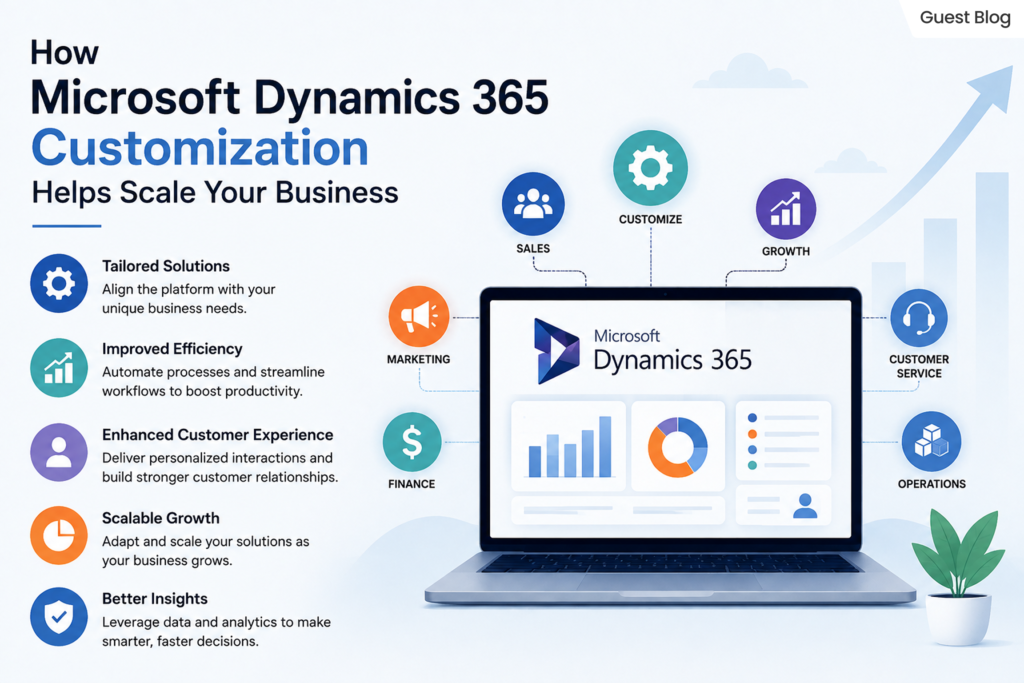
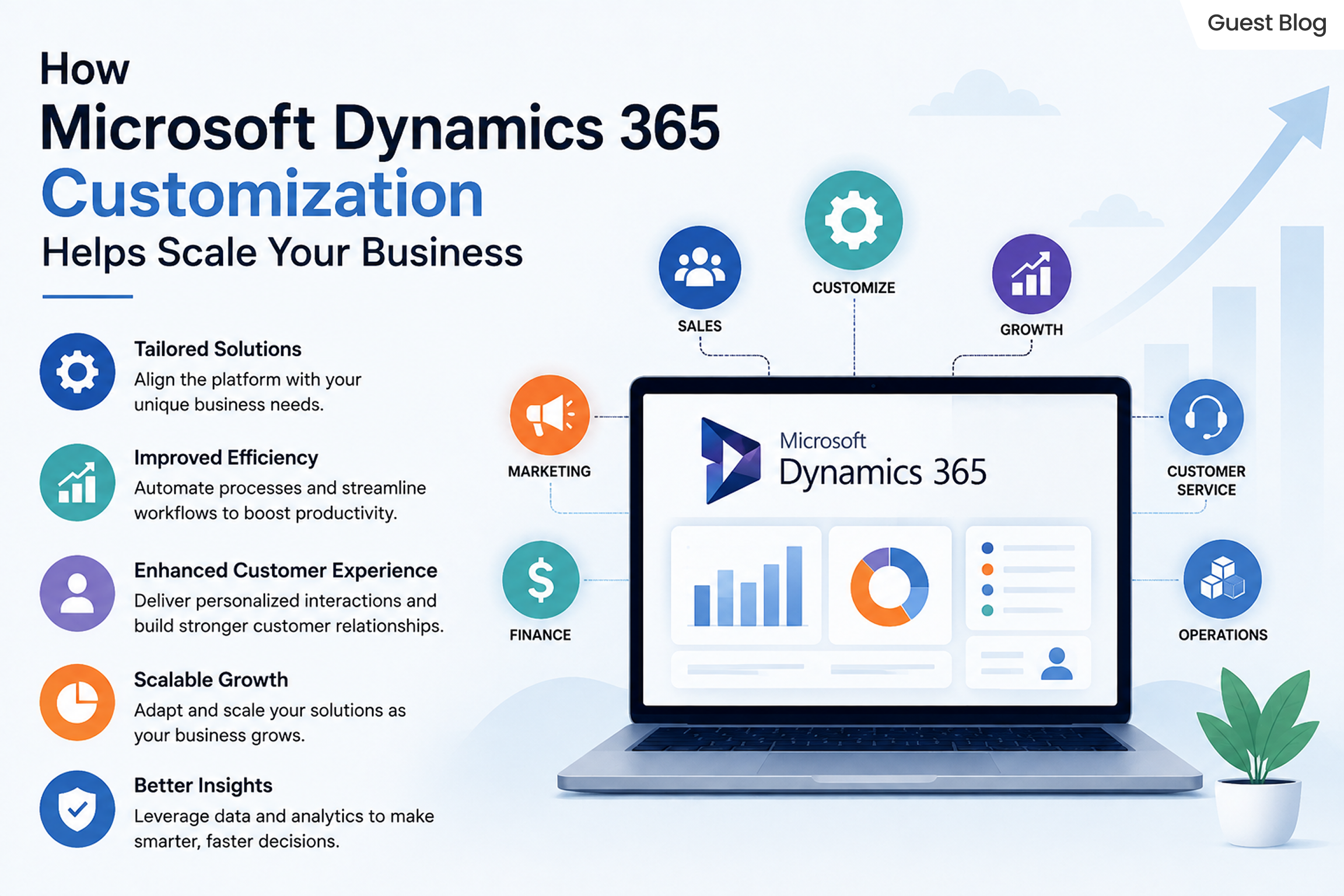
How Microsoft Dynamics 365 Customization Helps Scale Your Business?
microsoft dynamics 365 customization

Every market presents its own unique set of problems. MS Dynamics 365 provides guidance and solutions for many business areas, including customer service and operational resource management. Executing every aspect of your business and managing your procedures at scale is unfeasible with the features Dynamics 365 offers out-of-the-box customization. The strength of MS Dynamics 365 lies in its customizability. With Dynamics 365, you don’t have to press your business and your people into the processes of the software. Instead, the software assists your current workflow and processes.

Advanced Microsoft Dynamics 365 Customization Services provide automation, integrate with almost any software and provide your employees with advanced tools. Most importantly, these services help your employees make data-driven decisions. We will explore the extent of Dynamics 365 customization, the specific ways customization supports your business and additional tips and tricks to help you maintain success long after implementation of customization services.

What Is Microsoft Dynamics 365 Modification

Microsoft Dynamics 365 Customization modifies and improves the system to align to an organization’s needs, while keeping the core working. 


Customization can include: 

  • Creation of custom entities and fields 
  • Design of custom dashboards
  • Implementation of workflow automation
  • Creation of business rules 
  • Design of applications using Microsoft Power Platform 
  • Integration of third-party applications
  • Alteration of forms and reports 
  • Establishment of role-based user experiences 

Why Businesses Need Dynamics 365 Customization

Not two companies have the same way of running their business. There is always a unique way of having approval processes, sales cycles, reporting structures, and customer service processes.

On the other hand, the absence of customization may lead to:

  • Need to enter data manually 
  • Performing tasks repetitively 
  • Having ineffective work processes 
  • Having limited reporting capabilities 
  • Not having the application adopted 
  • Having challenges in growing the activities of the organization 

Customization of Dynamics 365 addresses these concerns by tailoring the software to the techniques of the business process instead of the business process adapting to the software’s restraints.

Benefits of Advanced Microsoft Dynamics 365 Customization Services

  • Unique Business Processes:  
    Customized Dynamics 365 services stretch the platform to your unique workflows and adapt the solution to your business instead of expecting process changes. 
  • More Productivity:  
    Custom workflows, forms and dashboards help employees be more efficient by ensuring employees only perform high-value work. 
  • Better User Experience:  
    Role-relevant data and features personalize dashboards. This leads to high adoption and low training times. 
  • Effortless Integration:  
    Dynamics 365 Customization allows effortless integration of Microsoft products and applications. 
  • Supports Digital Transformation:  
    Dynamics 365 Digital Transformation allows for smooth operations, better cross-departmental collaboration and automated business process management. Your organization becomes more flexible and more fit for competition. 

Primary Areas of Microsoft Dynamics 365 Customization


1. Custom Entities 

Create custom entities to store proprietary data for your business that are not included in other Dynamics 365 modules. 

2. Forms and Fields Customization 

Tailor presentation and input forms for users. 


3. Workflow Automation 

Eliminate common, burdensome tasks, approvals, and process requests, and receive alerts when reasoned. 


4. Dashboards and Reports 

Measure your business using dashboards and reports customized to track and display the metrics that matter to your organization. 


5. Third-Party Fusion 

Integrate Dynamics 365 with other corporate demands including Microsoft 365, Power BI and ERPs. 


6. Role-Based Security 

Manage what types of data users have access to based on what they are responsible for in the business. 


7. Power Apps and Power Automate 

Expand Dynamics 365’s capabilities, by developing your own apps and automating flows, respectively. 

Dynamics 365 Digital Transformation Through Customization

Optimizing processes and transforming customer experience is as important as adopting new technology for digital changes. 

Dynamics 365 Digital Transformation empowers businesses to:- 


  • Transform work processes 
  • Unify enterprise data 
  • Nurture customer relationships 
  • Create business process transparency 
  • Stimulate collaboration 
  • Work with distributed teams. 

Customization is important so that digital initiatives reflect your business versus process requests resulting from inflexible software.

Microsoft Dynamics 365 Customization for Business Growth

As organizations expand, so do their method, customer needs, and working needs. Microsoft Dynamics 365 Customization for business growth facilitates the unique adaptability required. The flexibility in Dynamics 365 incorporates the benefits of enhanced efficiency, improved collaboration, and scaling. Through customizing the workflow, automating procedures, and the integration of applications, companies are able to enhance their productivity in order to satisfy the demands of the market. Flexible solutions can maximize the value of an investment and can lead to sustainable growth for companies.

Customization of Dynamics 365 supports business growth in several ways:

  • Automating business processes to increase efficiency and reduce the need for formulaic processes
  • Improving customer satisfaction and loyalty by providing tailored and expedited services
  • Increasing productivity by means of personalized dashboards, forms, and workflows 
  • Syncing with Microsoft 365 and Power BI as well as ERP and other third-party applications 
  • Providing the ability to bring together data and teams to drive the company business forward 
  • Facilitating the expansion of Dynamics 365 business operations to support modern and flexible business functions in a digital age. 

Best Practices for Dynamics 365 Customization

If companies implement these strategies to Microsoft Dynamics 365 Customization, they will improve the efficiency and the capacity of their systems as well as enhancing the efficiency in maintenance of the system. When they focus on these components, businesses are able to optimize their investment and minimize problems that might occur in the near future. 


It is essential to determine the goals your company wants to accomplish, and then customize it in the Dynamics 365 system to that final goal. 


Second, try to use Dynamics 365 as is. Customizations, if necessary, should be the last resort. Since customizations increase the complexity of your system, it can be harder to maintain. 


Third, if you have a growing organization, plan for the growth by ensuring your customizations will support that growth. 


Fourth, efficiency of your users should be the focus. Dynamics 365 incorporates many automation features, workflows and processes. These should be designed in a way that users automatically use them. 


Finally, and most importantly, do thorough testing to validate your customizations before you roll them out to your team and lose your sanity if your system fails. 

Picking the Right Advanced Microsoft Dynamics 365 Customization Services

Selecting a trusted tailor-made partner is vital to the success of your project. 


Choose a provider who provides:- 

  • Certified Microsoft Dynamics experts 
  • Experience in the industry 
  • End-to-end implementation 
  • Integration capabilities 
  • Security best practices 
  • Support and maintenance on a regular basis 
  • Optimization of performance 
  • Training for users 

The ideal partner will align your technical abilities with your business aim and will ensure that you have a Dynamics 365 environment that will continue to evolve as your company expands. 

Common Mistakes to Ignore

Dynamics 365 Customizations fail to achieve what they set out to do because of the following common mistakes:- 

  • Over-customization without defined business value 
  • Paying no attention to future business growth 
  • Forgetting to train users 
  • Not keeping track of customizations 
  • No validation to assess whether customizations are ready for production 
  • Multiple workflows that accomplish the same task 
  • Inefficient use of a secure system 

Not avoiding these will cause an inefficient Dynamics 365 system. 

Common Challenges Solved by Microsoft Dynamics 365 Customization

A majority of businesses have issues with unreliable workflows and systems that are not accessible as well as inaccessibility to business processes. Microsoft Dynamics 365 Customization addresses these issues by tailoring the platform to meet your needs as a company, increasing productivity while enhancing the user experience. 

Common problems solved by customization can include: 

  • Manual and repetitive tasks can be automated through workflow automation. 
  • Business applications that are disconnected and seamless integrations with third party applications. 
  • Limited reporting capabilities with customized Dashboards as well as real-time Analytics. 
  • Complex user interfaces are created by creating form-based and interactive dashboards. 
  • Inconsistencies in data with custom validation rules or standardized procedures. 
  • Problems with scaling can be solved by changing the platform to accommodate the growth of businesses. 

Future Trends in Microsoft Dynamics 365 Customization

Technology is constantly changing; Microsoft Dynamics 365 Customization is changing to become more sophisticated and automated, and also fully automated and data-driven. Companies are embracing new technologies to boost efficiency, improve customer service and accelerate the speed in Dynamics 365 Digital Transformation. 

The most important patterns that will define the direction of are:- 

  • AI-powered automation increases the effectiveness of business processes and increases the quality of decision-making. 
  • Development without code and low-code with Microsoft Power Platform. 
  • Predictive analytics can assist in improving the planning and forecasting of business operations, as well as management of business. 
  • Cloud-native modifications allow for more capacity and greater flexibility. 
  • Advanced integration of data with Microsoft Fabric and Power BI. 
  • Specific to the industry, Microsoft Dynamics 365 Solutions tailored to specific business needs. 

ROI of Microsoft Dynamics 365 Customization for Growing Businesses

The investment in Microsoft Dynamics 365 Customization for business growth can yield tangible results by enhancing process efficiency, reducing manual labor, and enhancing satisfaction of customers. Customized solutions help companies make the most of their resources, increase productivity, and expand their capabilities in the course of time. 

The most important ROI benefits are: 

  • Lower operating costs by automating workflows. 
  • Improved productivity of employees through personalized processes and interfaces. 
  • More efficient decision-making with the latest dashboards, analytics, and real-time data. 
  • Increased customer satisfaction through personal interactions. 
  • Scalability that can support the growth of business operations.  

More efficient use and better utilization of Microsoft Dynamics 365 Solutions by aligning the platform with the goals of the business.

In Conclusion

Microsoft Dynamics 365 Customization offers an end-to-end solution for exploiting the efficiency of business operations and boosting productivity. By utilizing Advanced Microsoft Dynamics 365 Customization Services, companies can design automated processes, improve usability, and implement solutions that are scalable. Through the proper modifications, companies can increase the capabilities of Dynamics 365 and advance their digital transformation strategies and long-term growth strategies for their business.

Ready to transform the way your enterprise operates?

Share this blog on:

Search Blog

About Us

Global Data 365 is composed of highly skilled professionals who specialize in streamlining the data and automate the reporting process through the utilization of various business intelligence tools.

Follow us on:

Still using Jet Basics?

Get Free Upgrade
to Jet Reports

jet services

Subscribe to Our Newsletter

How Microsoft Dynamics 365 Customization Helps Scale Your Business Read More »
Jet Analytics vs D365 Data Entities 

Jet Analytics vs D365 Data Entities: Choosing the Right Power BI Reporting Strategy for Dynamics 365 F&O

Jet Analytics vs D365 Data Entities 

Each Dynamics 365 Finance & Operations (D365 F&O) team eventually asks the same question: how will Power BI actually connect to D365 F&O? On the surface, it looks like a simple decision. In practice but it is one of the most consequential architecture choice a finance or IT leader will make, because it not only determines how fast reports load but how much historical data survives and how many developers get pulled into every new reporting request and how much the ERP upgrade cycle will cost the business in rework. Two paths dominate this conversation; jet analytics and data entities.


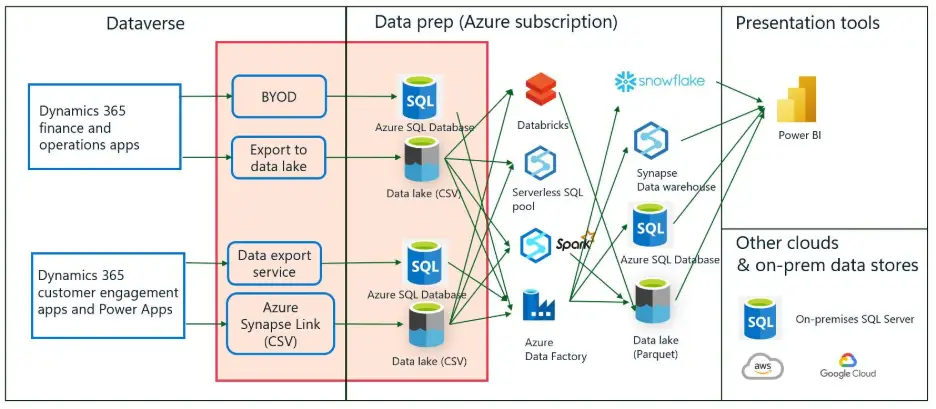
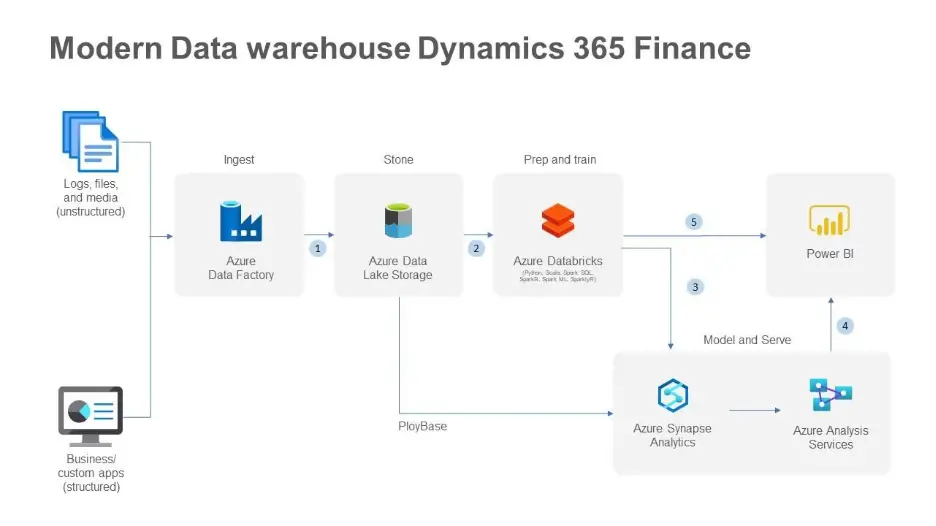
The first is connecting Power BI directly to D365 Data Entities through OData or Azure Data Lake exports and the path most organizations default to because it requires no additional licensing. The second is Jet Analytics, a purpose-built data warehouse and analytics platform designed specifically for Microsoft ERP environments. 


Both approaches can technically get D365 data into a Power BI report. What separates them is everything that happens after that first report is created and shipped: performance under real user load, resilience through D365 upgrades, historical trending, data governance and how much of the IT team’s time gets consumed responding to “can you add one more field” requests. This blog breaks down the Jet Analytics vs D365 Data Entities decision in detail, so finance, IT and BI leaders can choose an architecture that scales with the business rather than one that needs to be rebuilt every time D365 F&O changes.

The Reporting Challenge Inside D365 F&O

D365 F&O stores business data in a complex and normalized OLTP schema that was built to process transactions reliably not to answer analytical questions. That distinction matters more than most teams realize until they try to build production-grade Power BI reporting directly on top of the live system. 


When pulling meaningful and performant reports straight out of this structure without an intermediary layer, it introduces several architectural risks:
 

  • High query complexity caused by deeply joined transactional tables 
  • Risk of performance degradation on the live D365 environment during report execution 
  • Limited historical data retention within the operational system itself 
  • No consistent, governed semantic layer to keep cross-functional reporting aligned 

These risks don’t disappear because a report “works” in testing. They resurface later during month-end close, during a system upgrade or the first time a second business unit asks for the same numbers and gets a different answer.

Two Common Approaches to Power BI Reporting on D365 F&O

Organizations typically choose between two architectural paths when connecting Power BI to D365 F&O: 

  1. Direct via Data Entities – Power BI connects to D365 F&O through OData feeds or Azure Data Lake exports, pulling data directly from virtual entities or staging tables.

Jet Analytics  an ETL-based platform that extracts data from D365 F&O, transforms it into a clean, pre-modelled data warehouse and exposes it to Power BI through optimized semantic models. 

Recommendation: Jet Analytics is the recommended approach for organizations that require production-grade, scalable, and maintainable BI reporting on D365 F&O. The direct Data Entities approach is suitable only for ad-hoc exploration or narrow, low-frequency reporting needs. 

Jet Analytics vs D365 Data Entities: Detailed Comparison

The table below lays out a side-by-side comparison across the evaluation dimensions that matter most once reporting moves from a proof-of-concept into daily business use. 
 

FeatureJet Analytics ClassicD365 Data Entities → Power BI
Data Architecture Dedicated analytical data warehouse with star/snowflake schema. Optimised for BI workloads.Flat OData or Azure Data Lake exports of normalised OLTP tables. Power BI must perform heavy transformation.
Performance Queries run against a pre-built, indexed data warehouse. Sub-second response on large datasets.OData calls are throttled by D365 API limits. Large datasets cause timeouts or require incremental workarounds.
Impact on D365 Zero impact on live D365 environment. ETL runs on a separate database.OData queries execute against the D365 application tier, risking performance degradation.
Data History Full historical data retained in the warehouse from initial load onwards. Supports year-on-year comparison.Limited to what is currently in D365. Deleted or archived records may be lost. Historical trending is limited.
Data Quality ETL layer enforces cleansing, duplication, and business logic before data reaches Power BI.Raw D365 data is exposed as-is. Data quality issues must be handled inside Power BI or Power Query.
AI Readiness LimitedDesigned for AI and Copilot workloads
Pre-built ContentShips with 200+ pre-built KPIs, measures, and reports mapped to D365 F&O modules out of the box.No pre-built semantic layer. All measures and report logic must be developed from scratch in Power BI.
Semantic LayerGoverned, reusable semantic model with business-friendly naming and shared definitions.Each Power BI report builds its own model, leading to inconsistent definitions across reports.
Maintenance Upgrade-resilient. Jet maps changes in D365 schema automatically or via managed updates.D365 upgrades may break OData entity structures, requiring Power BI report rework after each update.
Scalability Designed for enterprise scale. Supports multi-company, multi-currency, multi-ledger consolidation.Scaling requires more complex Power BI Premium configurations and OData pagination handling.
Development Speed Pre-built models accelerate time-to-value. New reports can be built in days, not weeks.Each report requires full data modelling from scratch. Long development cycles for complex reports.
Licensing Additional licensed product (Jet Analytics). Cost justified by reduced development and support overhead.Scaling requires more complex Power BI Premium configurations and OData pagination handling.
Scalability Designed for enterprise scale. Supports multi-company, multi-currency, multi-ledger consolidation.Included within D365 licencing and Power BI licensing already in use. No additional software cost.
Data Access Layer Connects directly to D365 tables via Azure Synapse Link for Dataverse. Full table and field access with no API dependency.Limited to fields exposed through pre-built or custom Data Entities. New data requires entity
New Data Requests IT team adds missing tables or fields via drag-and-drop in Jet Analytics. No developer or release cycle needed.Each new field requires a developer to build or extend a Data Entity — ongoing development cost for every new requirement.
Data Sources Single warehouse supports D365 F&O plus any other source system (CRM, HR, third-party). One unified model in Power BI.Scoped to D365 F&O only. Combining with other systems requires separate Power BI datasets and manual joins.
Ease of Use Drag-and-drop interface accessible to the broader IT team. Low learning curve; no specialist ERP developer required.Requires specialist D365 developer skills (X++, OData) plus advanced Power BI knowledge to build and maintain.
A few rows deserve extra attention, because they’re the ones that determine whether a reporting program scales gracefully or collapses under its own maintenance burden. The Performance, Data History and Maintenance are where the direct Data Entities approach tends to hit its ceiling fastest and where most organizations end up re-evaluating their architecture six to twelve months after go-live.

Why Jet Analytics Outperforms the Direct Data Entities Approach?

– Purpose-Built for the Microsoft ERP Ecosystem 


The Jet Analytics has been developed exclusively for the Microsoft Dynamics ecosystem, with native connectors for D365 F&O, D365 Business Central and legacy AX versions. That focus shows up in three practical ways: 

  • The data model reflects D365 F&O business logic, not raw database tables 
  • Module-level coverage spans Finance and Supply Chain 
  • Dimensions and fact tables are pre-mapped to standard ERP reporting needs 

– Protecting the Live ERP Environment 


One of the most critical concerns for any D365 F&O administrator is the risk of reporting queries degrading ERP performance during business hours. With Jet Analytics: 

  • All analytical queries run against a separate SQL Server or Azure SQL data warehouse 
  • The ETL process runs on a schedule during off-peak hours, minimizing system load 
  • The live D365 environment is never queried at report runtime 

By contrast, connecting Power BI directly to OData Data Entities places query load on the D365 application tier itself which can visibly affect end-user experience during business hours, particularly around period close. 

– Consistent, Governed Data Definitions 


In organizations with more than one Power BI developer, a familiar problem emerges: the same metric gets defined differently across reports. “Revenue” in one dashboard might include intercompany transactions; the same word in another dashboard might exclude them and jet analytics closes that gap through:


  • A centralized semantic layer with agreed, documented measure definitions 
  • Business-friendly naming conventions accessible to non-technical users 
  • Shared dimensions that keep filtering consistent across every report 

– Built for Upgrade Resilience 


Microsoft releases regular updates to D365 F&O, and those updates can modify the underlying data entity structures without warning. Under the direct Data Entities approach, each major upgrade carries real risk of breaking existing Power BI reports overnight. The Jet Analytics mitigates this by:


  • Abstracting the Power BI model from the raw D365 schema 
  • Providing managed updates to the Jet data warehouse mappings, aligned to D365 release cycles 
  • Letting Jet absorb schema changes so Power BI reports don’t need to be rebuilt after every release 

– Accelerated Time-to-Value 


Jet Analytics ships with over 200 pre-built KPIs and measures covering the core D365 F&O modules, which means:


  • Immediate access to financial, operational, and supply chain reports from day one 
  • A foundation development teams extend rather than build from a blank canvas 
  • Reduced dependency on specialist Power BI developers for standard reporting needs 

– Multi-Company and Multi-Currency Consolidation 


For organizations operating across multiple legal entities or currencies, Jet Analytics provides native support for:
 

  • Cross-legal-entity financial consolidation with intercompany elimination 
  • Multi-currency reporting with currency translation handled at the warehouse level 
  • Group-level and entity-level reporting from a single Power BI model 

Achieving equivalent functionality through Data Entities alone requires complex, custom DAX and Power Query logic which significantly increases both development time and ongoing maintenance cost.

Direct Table Access via Azure Synapse Link: Removing the API Bottleneck 

A fundamental limitation of the Data Entities approach is that every single piece of information surfaced in Power BI must first be exposed through a D365 Data Entity. These entities are essentially API wrappers and if the field or table an analyst needs doesn’t already have a corresponding entity, it simply cannot be accessed without new development work. 

That constraint creates a recurring cost and bottleneck. Every time a business user requests a new field or metric, a developer has to: 

  • Identify the underlying D365 table and field
  • Build or extend a Data Entity to expose that field via the API 
  • Test and deploy the entity change, often requiring a full release cycle 
  • Update the Power BI dataset to consume the new entity output 

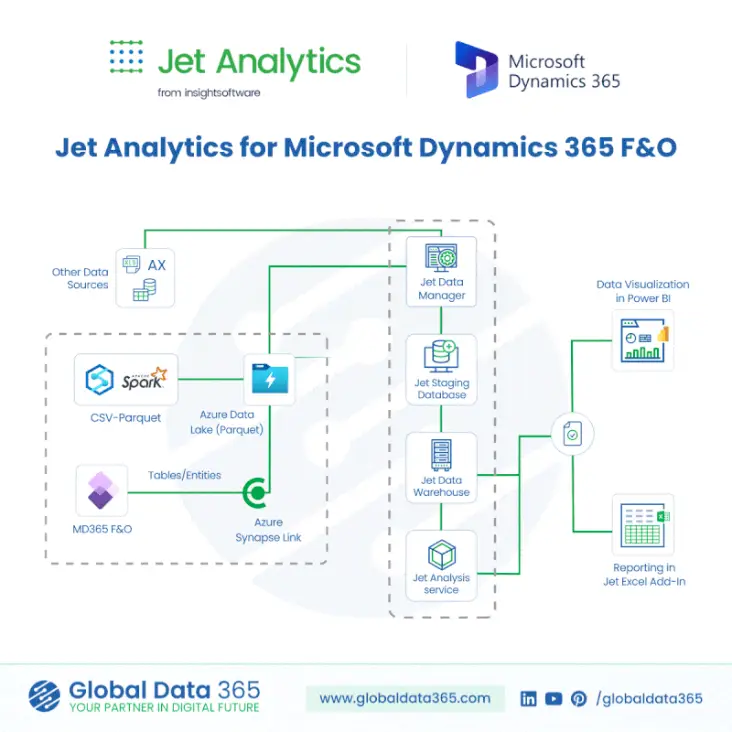
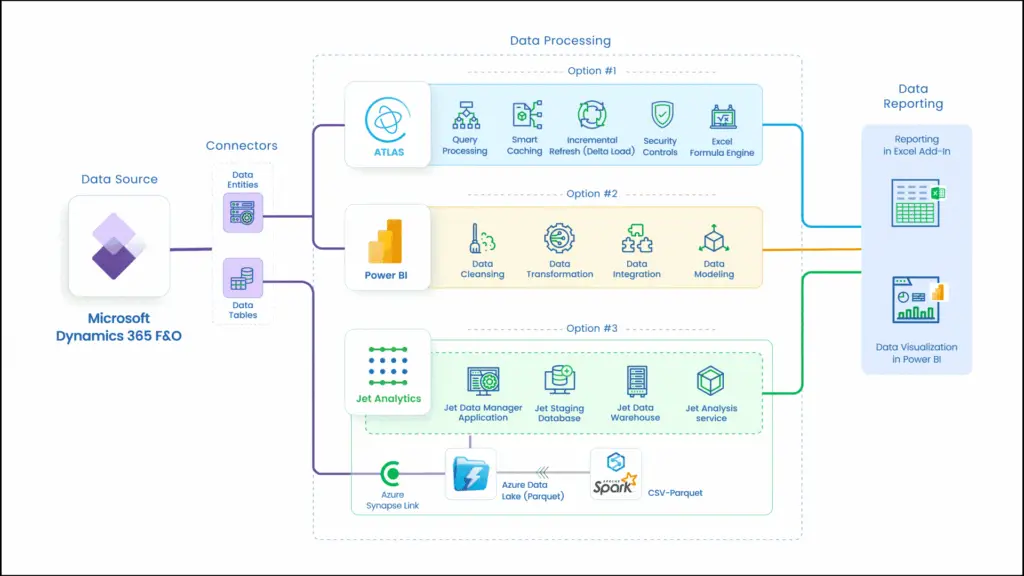
Jet Analytics bypasses this entirely by connecting directly to the underlying D365 F&O tables through Azure Synapse Link for Dataverse. Instead of routing through the API layer, Jet reads raw tables replicated from D365 into Azure Data Lake giving it full visibility into every table and field in the system, including those that have never been exposed by any Data Entity. 

Adding a previously unavailable field to a Power BI report does not require a developer or a code deployment. IT team members can locate the table and field directly within the Jet Analytics interface and include it in the data model using drag-and-drop eliminating recurring development costs as reporting requirements evolve.

How Jet Analytics Connects via Azure Synapse Link?

Understanding the underlying connection architecture makes it clear why Jet Analytics delivers more control, flexibility, and performance than the Data Entities / OData path. 

The Data Entities / OData Architecture (Current Approach) 

When Power BI connects to D365 F&O via Data Entities, the data flow passes through the application API tier: 

  1. Power BI sends a query request to the D365 F&O application tier via OData 
  2. The Data Entity — an API wrapper — translates that request into one or more underlying database queries 
  3. Results return through the OData API, subject to row limits, throttling, and pagination constraints 
  4. Power BI receives the data and must perform further transformation and modelling inside the report layer

This architecture places load on the live D365 application tier, is constrained to only what existing entities expose, and is subject to API throttling limits that cause timeouts on large datasets. 


The Jet Analytics Architecture via Azure Synapse Link

Jet Analytics connects at the database replication layer, bypassing the API entirely. The data flow looks like:

Jet Analytics vs D365 Data Entities for F&O
StepFlowDescription
Step 1D365 F&O → Azure Synapse Link for Dataverse Microsoft’s native replication service continuously copies D365 F&O tables — not entities — directly into Azure Data Lake Storage Gen2. This runs outside the D365 application tier with no performance impact on the ERP.
Step 2Azure Data Lake → Jet Analytics ETL Jet Analytics reads the replicated tables directly from the Data Lake. The ETL engine transforms, cleanses, and loads data into a structured analytical data warehouse. All tables and fields are available — no API gatekeeping, no entity dependency.
Step 3Jet Analytics Warehouse → Model Extension via Drag-and-Drop IT team members browse the full table catalogue and add any table or field to the data model visually. No code, no developer, no deployment cycle. Other data sources can also be added alongside D365 data in the same warehouse.
Step 4Jet Analytics Warehouse → Power BI Power BI connects to the Jet Analytics warehouse via a fast, direct SQL connection against a clean, indexed OLAP structure. No OData limits, no API throttling, no impact on D365 performance.

What Full Table Access Means in Practice?

Because Jet Analytics operates against the full catalogue of replicated D365 tables rather than the limited subset exposed through Data Entities it delivers complete control over the analytics database: 

  • Access to every standard and custom D365 F&O table replicated via Synapse Link 
  • Visibility of fields that have never been included in any Data Entity 
  • Ability to create relationships between any two tables in the catalogue 
  • No dependency on the D365 development team to expose new data for reporting 
  • Freedom to add additional source systems alongside D365 in the same warehouse 

In summary: the Data Entities approach gives you a window into D365 limited to what the API permits you to see. The Jet Analytics approach via Synapse Link gives you the full database, with complete control over which tables and fields are included in your analytics platform, without writing a single line of code. 

When Direct Data Entities May Still Be Sufficient?

The direct Data Entities approach isn’t wrong in every scenario it simply has a narrow window where it makes sense: 

  • Ad-hoc, exploratory analysis by a single developer, not intended for production use 
  • Narrow, low-volume reporting on a single D365 entity with simple filtering requirements 
  • Organizations in the very early stages of D365 adoption, before reporting requirements mature 

For any scenario involving multiple business users, recurring reports, finance or management reporting, or cross-module data, the limitations of the direct approach will quickly outweigh the cost savings of not licensing Jet Analytics.

Frequently Asked Questions?

For production-grade, recurring, or multi-user reporting, yes and jet offers sub-second query performance, full historical data retention, and a governed semantic layer none of which the direct Data Entities approach can reliably deliver at scale. 

It can OData queries execute against the D365 application tier, which means heavy reporting load competes with day-to-day transactional processing and can degrade the end-user experience. 

The Jet Analytics connects through Azure Synapse Link for Dataverse, reading replicated D365 F&O tables directly from Azure Data Lake bypassing the OData API layer and its row limits, throttling, and entity dependency entirely. 

No, Jet Analytics abstracts the Power BI model from the raw D365 schema and provides managed updates aligned to D365 release cycles, so schema changes are absorbed without requiring report rework. 

Yes. Jet Analytics supports ingestion from multiple source systems into a single warehouse, enabling one unified Power BI model across D365 F&O, CRM, HR, and third-party platforms something Data Entities cannot do on their own. 

Recommendation: Adopt Jet Analytics as the Standard Analytics Platform for D365 F&O

Adopt Jet Analytics as the standard analytics platform for D365 F&O reporting. The investment in Jet Analytics licensing is offset by the significant reduction in Power BI development effort, report maintenance overhead, and the risk of ERP performance incidents caused by uncontrolled direct queries. 


The direct Data Entities path will always look cheaper on day one, because it uses licensing the organization already owns. But that math changes quickly once a second business unit needs the same data, once the first D365 upgrade breaks a dashboard mid-quarter, or once someone in finance asks for a number from eighteen months ago that the live system no longer holds. Jet Analytics is built to remove those failure points before they become production incidents turning Power BI on D365 F&O from a fragile, developer-dependent process into a governed, scalable reporting platform the whole business can rely on. 

Ready to move from Data Entities to a governed Jet Analytics warehouse?

Share this blog on:

Search Blog

About Us

Global Data 365 is composed of highly skilled professionals who specialize in streamlining the data and automate the reporting process through the utilization of various business intelligence tools.

Follow us on:

Still using Jet Basics?

Get Free Upgrade
to Jet Reports

jet services

Subscribe to Our Newsletter

Jet Analytics vs D365 Data Entities Read More »

Business Central for ERP Platform with AI Automation 

Business Central for ERP Platform with AI Automation 

Business Central for ERP Platform with AI Automation 

How Business Central Is Becoming an Intelligent ERP Platform with AI Automation

In the world of business today companies have to do things faster. They need to cut costs and make decisions quickly. For a time traditional ERP systems have helped companies with money, supplies, inventory and customers. Now companies need more than just basic help. They need systems that can do things on their own, predict what will happen and give them ideas. 


This is where Business Central for ERP Platform is making a difference. Business Central is using ideas from Microsoft in artificial intelligence, automation and cloud technology to become a smart ERP system. Microsoft Dynamics 365 Business Central is helping companies work better and make decisions. 


Professional companies like Global Data 365 and Aegis Dynamics Business Central implementation services, they are getting access to advanced tools. These tools combine ERP systems with new automation ideas that use artificial intelligence. This is changing the way companies plan and work. Business Central is setting standards for how companies should work and making things better. 

Understanding the Evolution of Business Central for ERP Platform

Microsoft Dynamics 365 Business Central is not an ordinary tool to manage a company. It was made to help with things like accounting and inventory. Now it does a lot more. It has features that use artificial intelligence to make things automatic and help us guess what will happen in the future. 


Companies make a lot of data every day. It is hard to find information in all of that data without the right tools. Microsoft Dynamics 365 Business Central helps with this by using intelligence to turn data into something that can help the company. 

Microsoft Dynamics 365 Business Central uses intelligence to do things like:

  • Automate tasks that we have to do over and over
  • Reduce mistakes that people make
  • Help us guess what will happen in the future
  • Make our customers happy
  • Help us manage our inventory
  • Make the company work better

Such capabilities are turning Business Central for ERP Solutions to be the best option for organization who want digital transformation in the long run.

The Role of AI in Modern ERP Systems

Artificial intelligence is changing how ERP platforms work. By just recording transactions AI-enabled ERP systems look at data, find trends and suggest what to do.


The growth of AI-powered ERP solutions helps organizations make decisions before problems happen than reacting to them. AI watches business activities as they happen. Gives recommendations that help leaders respond fast to changes in the market.

Some key AI features now in ERP platforms include:

  • Dynamic analytics
  • Intelligent forecasting
  • Automated workflows
  • Natural language processing
  • Machine learning algorithms
  • Real-time business insights

These advancements help companies get more done while making things simpler. 

Business Central AI Automation: Transforming Daily Operations

One of the changes we have seen in the last few years is the introduction of Business Central AI automation capabilities.


AI automation helps cut down on boring manual work by letting the system take care of routine tasks on its own. This means employees can focus on projects instead of wasting hours on paperwork and administrative tasks.

1. Intelligent Financial Management

Financial teams usually spend a lot of time dealing with invoices balancing accounts and making reports. Business Central AI automation makes these tasks easier by:

  • Sorting transactions into categories
  • Finding things going on with the money
  • Helping to predict how cash we will have
  • Speeding up the process of paying invoices
  • Reducing mistakes in accounting

These things help the financial department be more accurate and efficient while still following the rules.

2. Automated Inventory Optimization

Managing inventory is very important for making a profit and keeping customers happy. 

With Business Central AI automation companies can: 


  • Predict what people will want to buy in the future 
  • Make sure they have the amount of stock 
  • Save money on storing inventory 
  • Avoid running out of things 
  • Make decisions about what to buy 

Business Central AI automation helps companies forecast what they need so they have the right things at the right time, which cuts down on waste and makes the business run better. 

3. Smarter Supply Chain Management

When there are problems with the supply chain it can really hurt the business. Business Central AI automation helps companies find problems and make changes before they happen.


Business Central helps optimize the supply chain by:

  • Predicting what people will want
  • Looking at how suppliers are doing
  • Suggesting when to restock
  • Planning logistics
  • Showing what is in stock, in time

Business Central AI automation makes supply chain management smarter and more efficient which helps the business run more smoothly.

Microsoft Business Central Automation Enhances Productivity

The use of Microsoft Business Central automation is becoming more popular. It is helping companies simplify the way they do things across all areas. 


Automation eliminates repetitive manual tasks from work methods enabling workers to devote their time to activities that add more values. 

1. Sales Process Automation

Sales teams can really benefit from using Microsoft Business automation. This is because it can do things like: 


  • Generate quotes for customers 
  • Make sure customer information is up to date 
  • Help with predicting sales 
  • Manage leads 
  • Process orders 

 All of these things help sales teams respond to customers faster and do their jobs better. 


2. Customer Service Automation

Customers expect a lot from companies these days. They want help fast. They want it to be personalized. 


Microsoft Business Central helps companies provide customer service by: 

  •  Automating the work that customer service teams do 
  • Keeping track of what customers are saying 
  • Giving customer service teams ideas based on what the customer is saying 
  • Providing information about customers in real time 

 This helps companies make customers happier while also saving money on customer service. 

3. Procurement Automation

When companies buy things it often involves a lot of paperwork and approvals. 


Microsoft Business Central automation makes buying things easier by: 

  •  Automatically creating orders 
  • Talking to suppliers 
  • Keeping an eye on how suppliers are doing 
  • Tracking the process of buying things 

AI-Powered ERP Solutions Drive Better Decision-Making

The real power of AI is its capacity to change data into unlawful understanding.


Traditional reporting usually looks at information. On the other hand, AI-powered Enterprise Solutions give predictive intelligence. This helps businesses get ready for opportunities and challenges.

1. Dynamic Analytics

Predictive analytics helps organizations to:

  • Forecast sales trends with AI
  • Anticipate what customers will demand
  • Identify risks early
  • Predict when equipment needs maintenance
  • Improve planning with AI insights

These insights help leaders make decisions with more confidence because they use AI.

2. Real-Time Business Intelligence

Business Central gives access to real-time dashboards and analytics. This allows decision-makers to keep an eye on execution all the time with AI.


Benefits include:

  • Responding to changes in the market
  • Improving visibility into operations
  • Enhancing planning strategically
  • Allocating resources better
  • Increasing profitability with AI insights

These insights help leaders make decisions with more confidence because they use AI.

The Importance of Business Central Implementation for AI Success

A successful Business Central implementation is key to using AI and automation properties in Microsoft Dynamics 365 Business Central. When Business Central is set up with the right business processes, data and workflows are improved, which helps AI tools give information and automate tasks well. If Business Central is not set up strategically companies may not get the most out of their ERP system.


Here are the main advantages of setting up Business Central for AI:

  • Ensures data is correct and clean for AI insights.
  • Makes workflows smoother to help with automation.
  • Helps with forecasting and decision making.
  • Makes it easier for users to adopt AI features.
  • Reduces operations and manual tasks.
  • Gets the most out of ERP technology investment.
  • Builds a base for future AI developments with Business Central.

The Future of ERP Systems Is AI-Driven

The future of ERP systems is really connected to how intelligence and machine learning are getting better. This is also linked to improvements in

cloud computing.

As time goes on ERP platforms will get smarter. Be able to do things on their own. They will also be able to predict things.

Some things that might happen in the future include:

  • Advanced AI assistants that can help us
  • Automation that can do things without anyone telling it to
  • Forecasting that is more accurate
  • Risk management that is smarter
  • Experiences that are tailored to each user
  • AI that is specific to each industry

Companies that start using these things early will have a big advantage over others.

Microsoft is always putting money into intelligence. This means that Business Central will always be one of the ERP systems.

Why Businesses Are Choosing Business Central for ERP Platform

Lots of companies are choosing Business Central for their ERP platform. They are doing this because it has: 


  • The ability to grow with their company because it is in the cloud 
  • All the things they need for ERP 
  • Artificial intelligence built in 
  • Easy integration, with other Microsoft products 
  • The ability to customize it to their needs 
  • Security to keep their information safe 

Conclusion

With enterprises adopting digital transformation, Business Central for ERP Platform is becoming a robust solution that offers intelligent automation capabilities, AI-driven insights and operational excellence. It makes organizations competitive in a fast changing market, from automating processes to enhancing decision-making. A successful Business Central implementation will help an organization do just that, providing a flexible and future-proof ERP environment that enables growth and evolution for years to come.

With Global Data 365’s Reporting Solution curated specially for the D365 Business Central you can choose from three powerful tools tailored to your business needs and reporting requirements. Whether you need flexible Excel reporting, a centralized data warehouse, or interactive business intelligence dashboards, we have the right solution to help you make faster, data-driven decisions..

Ready to transform the way your enterprise operates?

Share this blog on:

Search Blog

About Us

Global Data 365 is composed of highly skilled professionals who specialize in streamlining the data and automate the reporting process through the utilization of various business intelligence tools.

Follow us on:

Still using Jet Basics?

Get Free Upgrade
to Jet Reports

jet services

Subscribe to Our Newsletter

Business Central for ERP Platform with AI Automation  Read More »

key features of Finance and operations(F&O)

Key Features of Finance & Operations(F&O)

key features of Finance and operations(F&O)

F&O empowers businesses to streamline complex processes, drive operational efficiency, and make real-time, data-driven decisions. Whether you operate globally or locally, F&O provides the scalability and flexibility needed to support your growth strategy. Let’s explore the key features of Dynamics 365 Finance & Operations(F&O) and how they can help transform your enterprise operations.

Introduction to Dynamics 365 Finance and Operations(F&O)

Microsoft Dynamics 365 Finance & Operations (F&O) is a cloud-based enterprise resource planning (ERP) solution designed for medium to large organizations. As part of the Microsoft Dynamics 365 suite, it integrates core business functions; finance, supply chain, manufacturing, human resources and analytics into a single unified platform.

F&O empowers businesses to streamline complex processes, drive operational efficiency, and make real-time, data-driven decisions. Whether you operate globally or locally, F&O provides the scalability and flexibility needed to support your growth strategy.

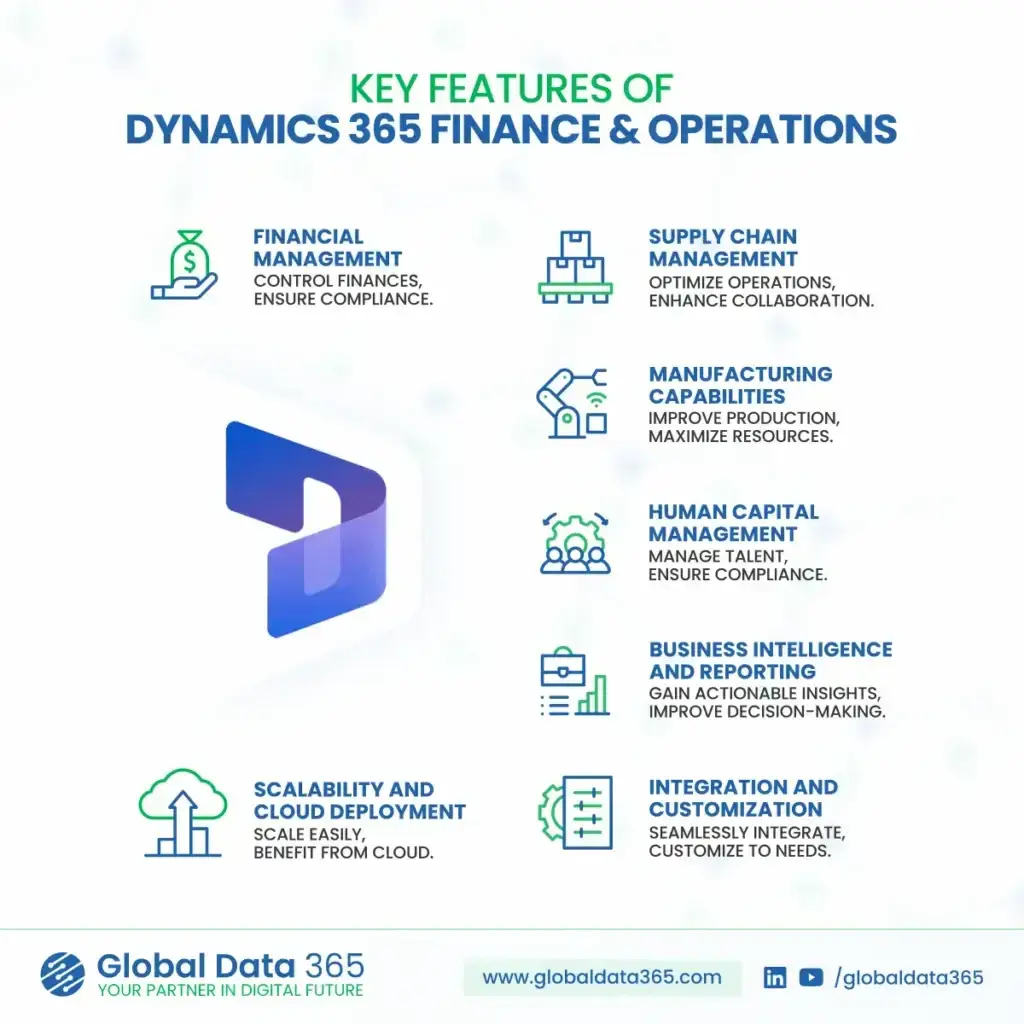
Key Features of Finance and Operations(F&O)

Key Features of finance and operations (F&O)

Financial Management

Gain full control over your organization’s finances and ensure compliance across global operations.


  • General Ledger & Accounting: 
    Automate accounting processes and maintain accurate financial records.

  • Accounts Payable & Receivable: 
    Track payables, receivables and manage credit efficiently.

  • Global Compliance: 
    Ensure regulatory compliance with multi-currency, multi-language, and multi-entity support.

  • Budgeting & Forecasting: 
    Improve financial planning with robust budgeting tools and real-time forecasting.

Supply Chain Management

With powerful tools for inventory, logistics and procurement, F&O helps businesses build a resilient supply chain. It enables faster response to market changes and ensures product availability where it matters most.

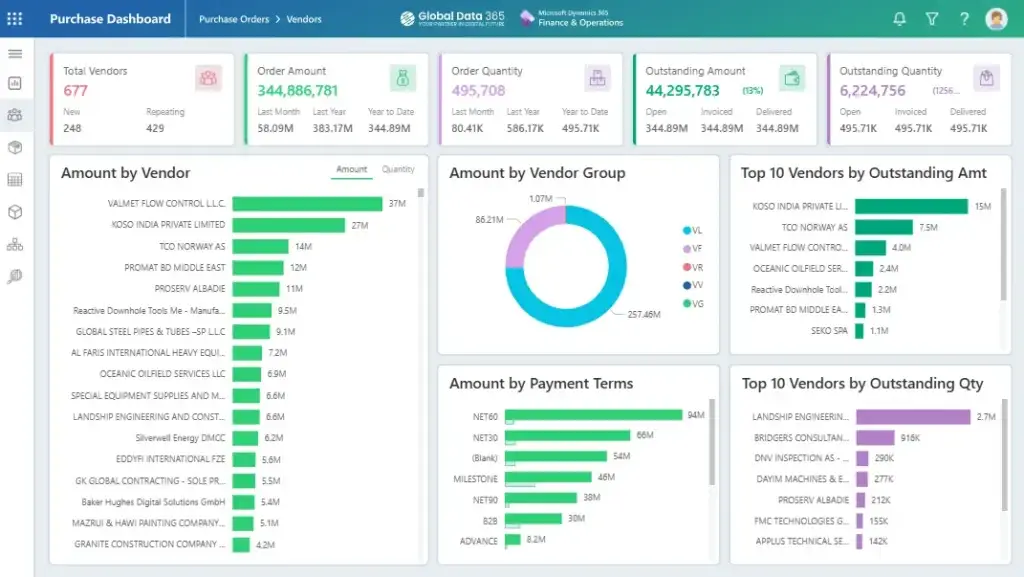
  • Procurement & Sourcing:
    Automate purchasing processes and vendor collaboration.

  • Inventory & Warehouse Management: 
    Gain visibility into stock levels, movements and warehouse operations.

  • Logistics & Transportation:
    Optimize routes, manage shipping and reduce delivery costs.

  • Demand Forecasting:
    Predict demand to improve fulfillment and reduce waste.

Sales Components in Dynamics 365 F&O

Dynamics 365 Finance & Operations includes powerful sales capabilities that help organizations manage the entire order-to-cash cycle efficiently. From capturing leads to processing invoices, the system ensures accuracy, speed, and full visibility across all sales operations.

  • Sales Order Management: Create, manage, and track sales orders in real time with complete visibility into order status, pricing and fulfillment.

  • Customer Management: Maintain a centralized customer database with detailed information including billing, shipping, credit limits, and transaction history.

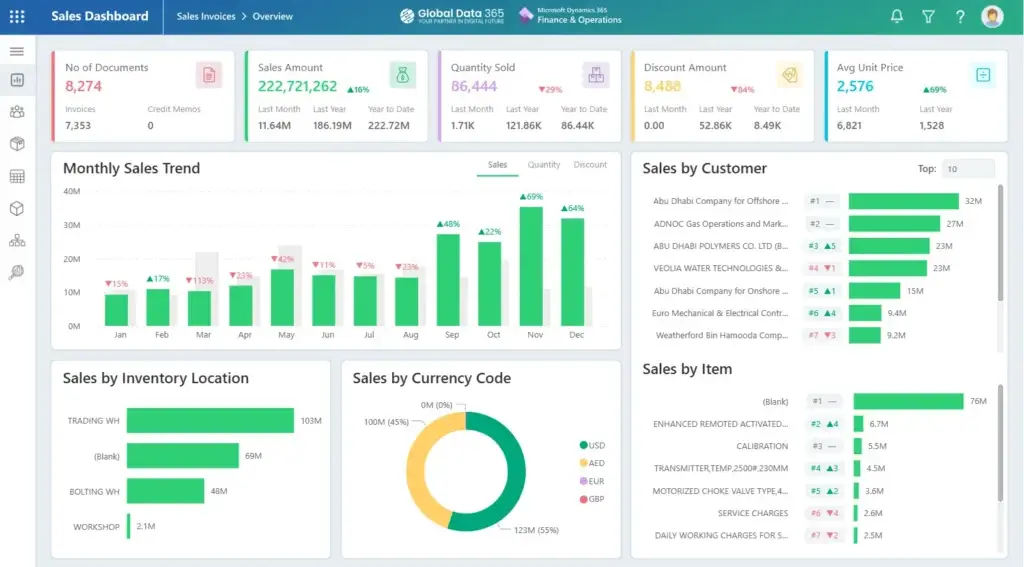
  • Sales Analytics & Reporting: Leverage built-in analytics and Power BI integration to track sales performance, revenue trends, top customers, and product demand in real time.

Manufacturing Capabilities

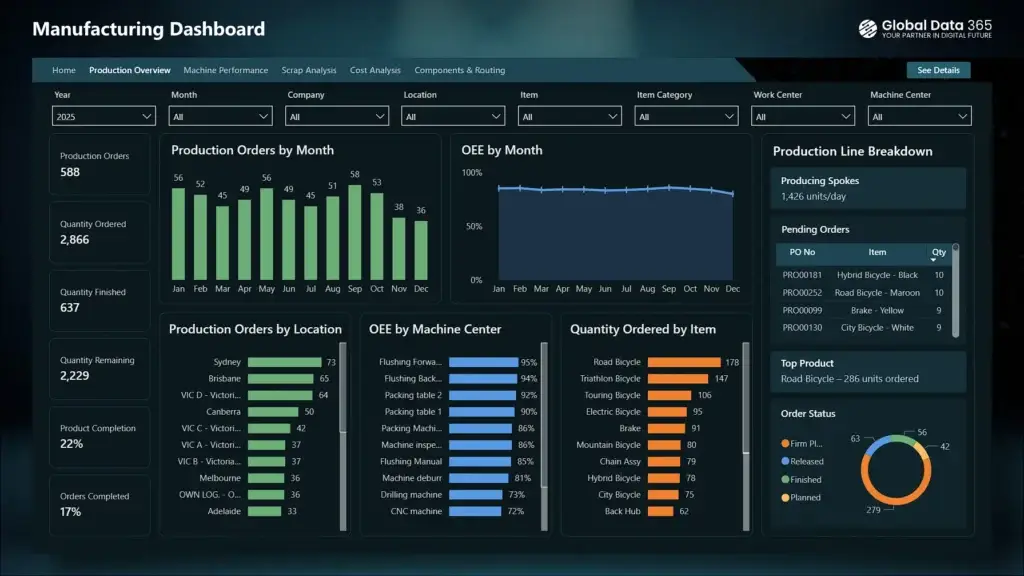
Dynamics 365 F&O empowers manufacturers with tools to streamline production, reduce downtime and ensure quality. Whether it’s discrete, lean or process manufacturing, the system offers end-to-end visibility and control.

  • Production Control:
    Plan and execute discrete, lean and process manufacturing.

  • Shop Floor Management
    Track real-time operations on the production floor.

  • Resource Optimization:
    Allocate machines, labor and materials efficiently.

  • MRP & BOM Management: 
    Streamline planning with Material Requirements Planning and Bill of Materials.

Human Capital Management

From recruitment to retirement, F&O simplifies human resource operations. It offers a centralized platform to manage employees, foster growth and ensure compliance with labor laws.


  • Core HR Functions:
    Track employee data, benefits, and organizational structure.

  • Payroll Integration:
    Automate payroll processing and ensure accuracy.

  • Performance & Talent Management:
    Develop and retain top talent with integrated performance tracking.

  • Compliance & Reporting:
    Maintain workforce compliance with global regulations.

Business Intelligence & Reporting

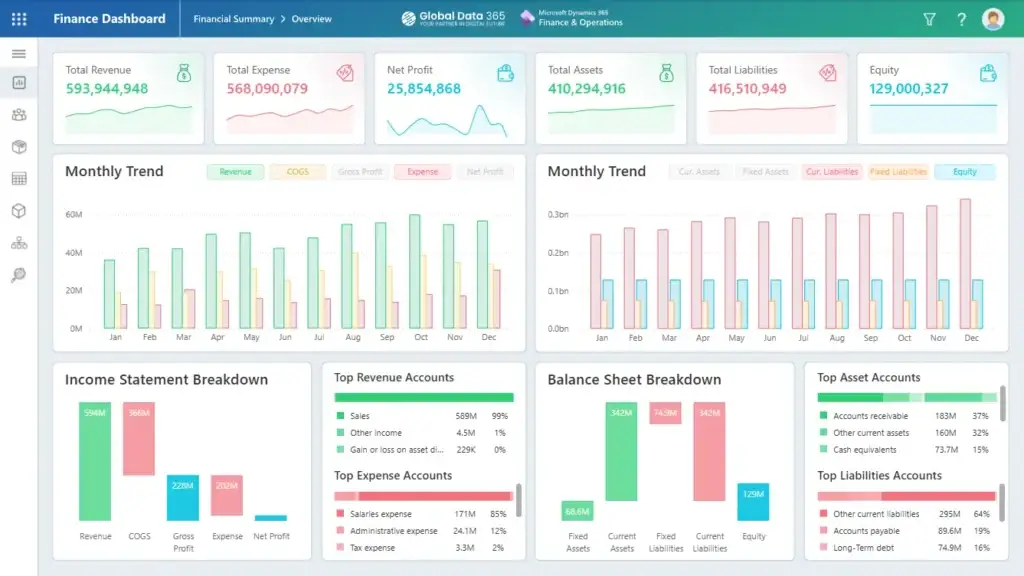
Built-in analytics and reporting tools turn raw data into actionable insights. However there are multiple tools available as reporting solution for both cloud and on prem d365 F&O that helps businesses make informed decisions with real-time data, dashboards and predictive analytics.


  • Real-Time Dashboards: 
    Monitor KPIs, financial metrics, and operational health at a glance.

  • Advanced Analytics:
    Use embedded Power BI to uncover trends and drive performance.

  • Custom Reports:
    Generate financial and operational reports tailored to your business needs.

  • Data-Driven Decisions:
    Empower teams to make informed choices based on reliable data.

F&O reporting solutions

With Global Data 365’s Reporting Solution curated specially for the D365 F&O you get three tools to opt from for your business needs and requirements.

Scalability & Cloud Deployment

Designed to grow with your business, F&O provides the flexibility of cloud-based deployment. It ensures high availability, global reach and scalability without compromising performance.


  • Flexible Deployment:
    Choose between on-premises, cloud or hybrid deployment.

  • Global Scalability:
    Expand operations without compromising performance.

  • Security & Reliability:
    Rely on Microsoft Azure’s enterprise-grade security and uptime.

  • Automatic Updates: 
    Stay current with continuous platform enhancements and security patches.

Integration & Customization

Dynamics 365 F&O seamlessly connects with other Microsoft products and third-party systems. Its flexible architecture allows businesses to tailor processes and workflows to fit their unique needs.


  • Seamless Integration:
    Connect with other Microsoft products like Office 365, Teams, Power BI and more.

  • Low-Code Customization:
    Use Power Platform to build custom workflows and apps.

  • Industry-Specific Extensions:
    Deploy tailored solutions to support your industry’s challenges.

  • API Connectivity:
    Integrate with external systems via REST APIs and data connectors.

In Conclusion

Microsoft Dynamics 365 Finance & Operations offers a powerful, end-to-end ERP solution that enables organizations to unify financials, optimize supply chains, manage production and make intelligent decisions with real-time insights. Whether you’re managing multiple entities across geographies or seeking to scale efficiently with cloud-native solutions, F&O delivers the tools and agility your enterprise needs to lead in today’s competitive market. With the key features of F&O, businesses gain a flexible foundation to drive growth, innovation, and operational excellence.

Ready to transform the way your enterprise operates?

Share this blog on:

Search Blog

About Us

Global Data 365 is composed of highly skilled professionals who specialize in streamlining the data and automate the reporting process through the utilization of various business intelligence tools.

Follow us on:

Still using Jet Basics?

Get Free Upgrade
to Jet Reports

jet services

Subscribe to Our Newsletter

Key Features of Finance & Operations(F&O): Empowering Enterprise Growth Read More »